Best L-Shaped Desks for Better Ergonomics and Comfortable Work
The best L-shaped desk for ergonomics gives you room to position your monitor, keyboard, and frequently used items comfortably—and, if adjustable, lets you alternate between sitting and standing. SIAGO and OffiGo are strong options for buyers who want electric height adjustment; PRAISUN adds a movable monitor stand, while Casaottima and SEDETA offer height-adjustable corner workspaces. Compare the desk’s height range, layout, storage, and screen-positioning features with your room and working habits.
| Desk | Best for | Ergonomic feature |
|---|---|---|
| SIAGO 63×55 | Multiple devices | Three height presets |
| OffiGo 63-inch | Flexible room layouts | Reversible design |
| PRAISUN 63-inch | Screen positioning and storage | Movable monitor stand |
| Casaottima 63-inch | Simple sit-stand use | Memory keypad |
| SEDETA 55-inch | Organized workspaces | Three saved heights |
SIAGO 63×55-Inch Electric Standing Desk

Best for: People who need generous space for several devices and want to switch between sitting and standing. The 63-by-55-inch L-shaped surface creates separate work zones, which can help keep frequently used items within reach.
The electric desk adjusts from 27.5 to 45.7 inches and has three memory presets for saving preferred heights. Its listed features also include a child safety lock and a stated 250-pound load-bearing test. This combination makes it a practical choice for users who want repeatable height settings and a large corner workstation.
Limitation: The listed adjustment range may not suit every user or chair setup. Check that its minimum and maximum heights fit your seated and standing posture before choosing it.
OffiGo 63-Inch Reversible Standing Desk
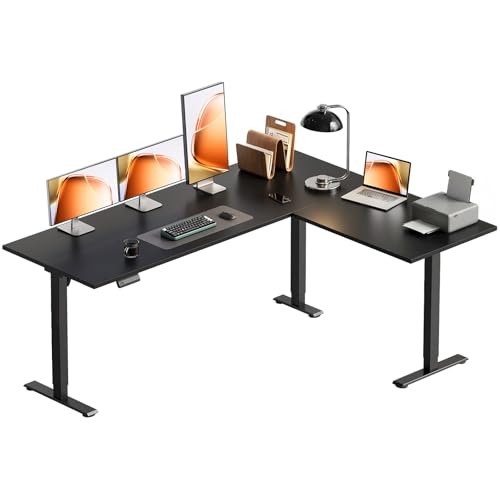
Best for: Buyers whose room layout determines which side of the desk should extend. The reversible sub-desktop can be assembled on the left or right, making this a more adaptable option for different corner arrangements.
The electric height range is 27.9 to 46.1 inches, and three customized height buttons provide one-touch access to saved positions. Its spacious surface is described as suitable for multiple laptops and monitors, with room to separate office and entertainment areas. Choose this desk if you need both layout flexibility and sit-stand adjustment.
Limitation: The product information does not specify a monitor riser or dedicated storage. Plan separately for screen height and supplies if those are priorities.
PRAISUN 63-Inch Desk With Monitor Stand

Best for: Seated workers who want a dedicated way to raise their monitor and keep office items organized. Its movable monitor stand can be placed on the main or side desktop, helping users arrange the screen position around their setup.
The desk includes four AC outlets, one USB-C port, and one USB-A port. Two fabric drawers, a file drawer, and an open shelf provide storage for supplies and documents. The 18.9-inch-deep main desk and side table create separate zones for work, study, or gaming.
Limitation: The listed features do not describe electric height adjustment. Choose another model if switching between sitting and standing is a key ergonomic requirement.
Casaottima 63-Inch Electric Standing Desk

Best for: Home-office users who want a straightforward L-shaped surface with electric sit-stand adjustment. Its large desktop is described as suitable for multiple monitors, laptops, or gaming equipment, making it useful for workstations that need more than one screen.
The height adjusts from 28.4 to 45.7 inches using a memory keypad. That range and saved-position control allow users to set preferred working heights and return to them easily. Choose this model if you want an adjustable corner desk without the storage-focused design of a cabinet or drawer workstation.
Limitation: The provided product details do not state the number of saved positions or describe included storage. Verify those details if you need specific memory settings or built-in organization.
SEDETA 55-Inch Standing Desk With Drawers

Best for: People who want adjustable height and substantial storage in a compact corner workstation. The 55.1-by-55.1-inch design includes six fabric drawers, open storage, a hook, and a CPU holder, helping keep supplies and equipment off the main work surface.
The desk adjusts from 28.3 to 47 inches and saves three preferred heights. Two drawers are designed for Letter or A4 files, while four box drawers can hold office or household items. This model is a better fit than a minimal desk for users who value an organized workspace and need room for documents.
Limitation: Its numerous storage features may be unnecessary if you prefer an open, uncluttered desk with few built-in components.
Buying Guide: How To Choose An Ergonomic L-Shaped Desk
What desk height range should you look for?
Compare the stated adjustment range with your own seated and standing positions. When seated, aim to keep shoulders relaxed, elbows near your sides, and forearms roughly level with the keyboard. When standing, adjust the work surface so your shoulders remain relaxed and your wrists are not forced upward. Desk range alone does not guarantee a comfortable fit; chair height and the thickness of your keyboard or desktop accessories also matter.
Is an electric standing desk necessary?
Choose an electric model if you expect to change desk height regularly and want preset positions. SIAGO, OffiGo, Casaottima, and SEDETA list electric adjustment. PRAISUN is a better match for buyers who prioritize a movable screen stand, charging, and storage, rather than a stated sit-stand function.
How should you arrange an L-shaped workstation?
Place your main monitor directly in front of your usual seated or standing position, not at the far corner of the desk. Keep your keyboard and mouse close enough to use without reaching. Use the return side for secondary screens, paperwork, or items used less often. A reversible desk can help match the layout to your room, while a movable monitor stand can give more flexibility in screen placement.
How much space and storage do you need?
Measure the corner and check the desk’s full dimensions before buying. Leave space for the chair and for moving around the workstation. Choose a larger surface for multiple monitors or separate task zones; choose built-in drawers or shelves if supplies regularly crowd your work area. Keep heavy or frequently used items easy to reach rather than placing them at the far end of the L.
Frequently Asked Questions
Are L-shaped desks good for ergonomics?
They can be, if the monitor, keyboard, and mouse are positioned near the user and the desk height supports a comfortable posture. The shape provides workspace, but it does not automatically ensure ergonomic setup.
Should a monitor be placed in the corner of an L-shaped desk?
Usually, place your primary monitor in front of your main sitting or standing position. A screen positioned deep in the corner may encourage twisting your neck or torso.
Does a standing desk mean you should stand all day?
No. An adjustable desk lets you vary your working position. Alternate between sitting and standing as comfortable, and avoid staying in one position for long periods.
Is a monitor stand useful with an L-shaped desk?
It can be useful when it raises the screen to a comfortable viewing height or frees desktop space. The PRAISUN model includes a movable stand; the other listed desks do not specify one.
How do I know whether an adjustable desk fits me?
Compare its minimum and maximum heights with your preferred seated and standing work positions. Consider your chair, footwear, and keyboard setup, and confirm the workspace dimensions fit the room.