Best 34-Inch Dual Monitor Stands for Flexible Desk Setups
The best 34-inch dual monitor stand depends on each screen’s weight, VESA pattern, and your desk layout. HUANUO is best for two larger monitors and broad positioning adjustments; VIVO’s telescoping desk mount is better for a flush-to-wall setup; and VIVO’s freestanding stand suits desks that cannot use a clamp. The 5Rcom offers a size range that includes 34-inch screens, while VIVO’s pneumatic model is suited to users who want spring-assisted height adjustments.
| Stand | Best for | Key fit information |
|---|---|---|
| HUANUO HNDS7 | Heavier screens and wide adjustment | 13–40 inches; 26.4 lb per arm |
| VIVO STAND-TS38C | Flush-to-wall placement | 27–38 inches; 22 lb per screen |
| VIVO STAND-V038FG | Freestanding installation | 13–38 inches; 22 lb per screen |
| VIVO STAND-V200O | Spring-assisted positioning | Up to 35 inches; 26.4 lb per arm |
| 5Rcom Dual Monitor Stand | Desks with clamp or grommet mounting | 17–34 inches; 4–22 lb per arm |
HUANUO HNDS7 Dual Monitor Stand

The HUANUO HNDS7 is best for users who want a wide adjustment range or need support for heavier 34-inch screens. Its arms fit 13- to 40-inch monitors and are rated for up to 26.4 pounds per arm. Supported VESA patterns are 75 × 75 mm and 100 × 100 mm.
The arms raise up to 21.1 inches and extend up to 25.59 inches. Screens can tilt from -30 to +85 degrees, swivel from -90 to +90 degrees, and rotate 360 degrees. The product also lists a USB feature and a dual C-clamp design. Choose it if screen positioning and arm capacity are priorities. Check both monitors’ weights and VESA patterns before buying.
VIVO Telescoping Desk Mount
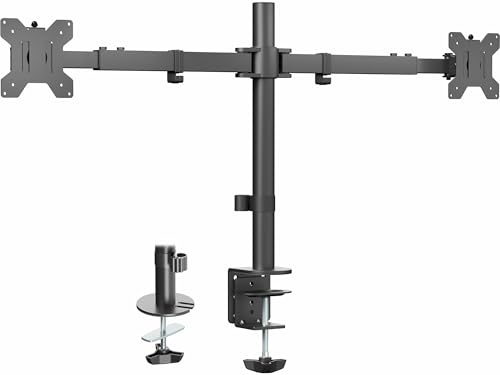
This VIVO mount is best for a desk positioned near a wall. Its telescoping arms expand outward without extending past the desk’s back edge, allowing a flush-to-wall arrangement. It supports two 27- to 38-inch screens, with a maximum listed weight of 22 pounds per screen and VESA 75 × 75 mm or 100 × 100 mm patterns.
The arms span 24 to 39.5 inches from bracket to bracket. The mount uses a heavy-duty C-clamp or an optional grommet mount, and the maximum recommended desktop thickness is 3.25 inches. Choose it if minimizing space behind the desk is important. Its 22-pound-per-screen limit may not suit heavier 34-inch monitors.
VIVO Freestanding Glass-Base Stand
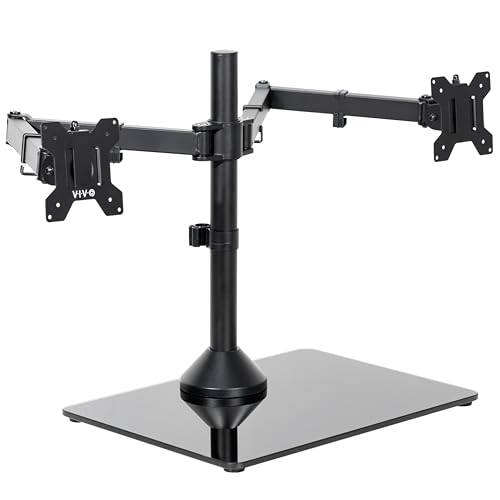
The VIVO STAND-V038FG is best for buyers who prefer a freestanding stand instead of attaching a mount to the desk edge. It supports two monitors from 13 to 38 inches, up to 22 pounds each, with 75 × 75 mm or 100 × 100 mm VESA holes. Its tempered-glass base measures 17 by 12.8 inches and has padding underneath.
Position screens by adjusting their height along the center pole, tilting from -90 to +90 degrees, swiveling 180 degrees, or rotating 360 degrees. Portrait and landscape orientations are supported. Choose this stand if a clamp or grommet installation is unsuitable. The base occupies desk space, so measure the available surface before choosing it.
VIVO Dual Pneumatic Arm Mount

This VIVO stand is best for users who want spring-assisted adjustments for two large monitors. It fits screens up to 35 inches and 26.4 pounds per arm, with VESA 75 × 75 mm or 100 × 100 mm patterns. Its pneumatic arms counterbalance monitor weight to help with height repositioning.
The mount provides 10.8 inches of height adjustment, tilt from -90 to +90 degrees, 180-degree swivel, and 360-degree rotation. It attaches with a C-clamp to desks up to 3.15 inches thick or an optional grommet mount to desks up to 1.7 inches thick. Choose it if smooth, spring-assisted repositioning matters. It is not listed for screens larger than 35 inches.
5Rcom Dual Monitor Stand

The 5Rcom stand is best for buyers with monitors at the upper end of its stated size range: 34 inches. It supports screens from 17 to 34 inches and 4 to 22 pounds per arm. VESA compatibility is 75 × 75 mm and 100 × 100 mm. The included mounting options are a C-clamp and a grommet mount.
Its arms swivel 90 degrees, tilt from -45 to +90 degrees, and rotate 360 degrees. Choose this model if both monitors meet the 22-pound limit and you want a choice of desk attachment methods. Because 34 inches is the maximum listed screen size, it is not the right pick for larger monitors.
Buying Guide: How to Choose a 34-Inch Dual Monitor Stand
Will the stand fit both monitors?
Check screen size, weight, and VESA mounting pattern separately for each monitor. A stand’s maximum screen size does not guarantee a fit if a monitor exceeds the per-arm weight limit or lacks a supported 75 × 75 mm or 100 × 100 mm VESA pattern. Also confirm that the screen’s shape and mounting location leave room for the arms to move.
Should you choose a desk clamp or a freestanding base?
A clamp or grommet mount can keep a large base off the desktop, but the desk must accommodate the attachment method and thickness limits. A freestanding stand avoids clamping to the desk edge, but its base takes up surface area. Measure your desk before choosing either style.
How much adjustment do you need?
Compare height range, arm extension, tilt, swivel, and rotation. Long extensions can help position screens on deeper desks, while telescoping arms are designed for a more flush-to-wall layout. Pneumatic arms offer spring-assisted height positioning; fixed-pole designs adjust height along a center column.
What should you confirm before ordering?
Measure the desk, confirm each monitor’s weight and VESA pattern, and check whether the stand’s stated maximum screen size includes your exact model. If using a clamp or grommet, compare the desk’s construction and thickness with the product’s listed mounting limits.
Frequently Asked Questions
Can a 34-inch monitor fit on these stands?
Yes. All five options list support for 34-inch screens, but weight and VESA limits still apply. The 5Rcom lists 34 inches as its maximum screen size.
What VESA pattern should I check?
Each selected stand lists support for 75 × 75 mm and 100 × 100 mm VESA patterns. Confirm the pattern on both monitors before purchasing.
Is a freestanding stand better for every desk?
No. It avoids attaching a mount to the desk, but its base uses desktop space. A clamp mount can save that surface area if the desk supports the required installation.
What is the advantage of a pneumatic monitor arm?
A pneumatic arm counterbalances monitor weight to support spring-assisted height adjustments. The VIVO STAND-V200O lists 10.8 inches of height adjustment.
Can these stands hold monitors larger than 34 inches?
Some can: the HUANUO lists support up to 40 inches, and the freestanding VIVO lists support up to 38 inches. Always check the stand’s per-screen weight limit and VESA requirements as well.