Best Concrete TV Wall Mounts for Secure, Flexible Viewing
The best concrete TV wall mount depends on your screen size, weight, VESA pattern, and whether you want a fixed-tilt or full-motion design. The Perlegear is best for large TVs and broad angle adjustment; the Amazon Basics is a simpler choice for smaller screens; and the monTEK suits compact-to-mid-size TVs. PERLESMITH offers a low-profile tilt option, while Mounting Dream provides full motion for larger screens, with concrete anchors available upon request.
| Mount | Best For | TV Size Range | Movement |
|---|---|---|---|
| Perlegear | Large TVs and wide viewing angles | 42–90 inches | Full motion |
| Amazon Basics | Smaller TVs on concrete or brick | 26–55 inches | Full motion |
| monTEK | Compact and mid-size TVs | 23–65 inches | Full motion |
| PERLESMITH | Low-profile tilt mounting | 23–60 inches | Tilt |
| Mounting Dream | Large TVs needing articulation | 42–90 inches | Full motion |
Perlegear Full-Motion Mount for Large TVs

Best for: Large flat or curved TVs when viewers want to adjust the screen from different seats. This mount fits most 42- to 90-inch TVs, supports up to 132 pounds, and accommodates VESA patterns from 200 × 100 mm to 600 × 400 mm. Its listed wall types include concrete and brick, as well as specified wood-stud spacing.
The full-motion design offers up to 50 degrees of swivel in either direction and tool-free tilt from +5 to -15 degrees. The product information also describes post-installation leveling, security locks, and a reinforced wall plate. It is the most broadly specified large-screen pick in this group.
Limitation: The listing says an extension bracket is needed for studs spaced 24 inches apart, and advises checking wall type, TV size, VESA pattern, and spacing before purchase.
Amazon Basics Full-Motion Mount for Smaller TVs

Best for: Buyers mounting a smaller TV on a concrete or brick wall who want a straightforward articulating option. The listed range is 26 to 55 inches, with support for TVs up to 80 pounds. The product is described as designed for concrete, brick, and single wood studs.
This mount is a useful alternative when a large-screen bracket would be unnecessary. Its listed full-motion format includes swivel and tilt, allowing the screen to be repositioned rather than fixed in one direction. Check the product’s “Designed for” details against the TV’s dimensions and mounting requirements before choosing it.
Limitation: The supplied feature information does not specify a VESA range or the exact swivel and tilt angles, so confirm those details for your TV before purchase.
monTEK Full-Motion Mount for 23–65-Inch TVs
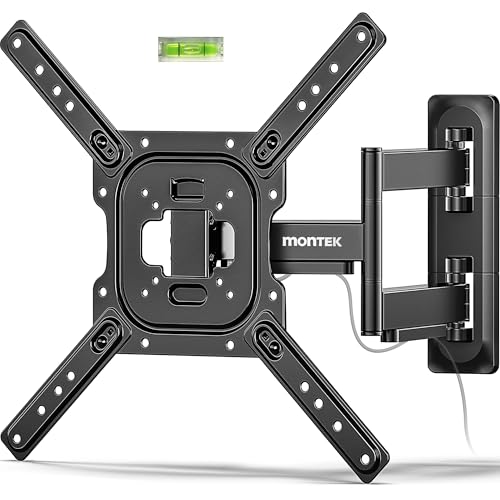
Best for: Compact-to-mid-size flat or curved TVs, including compatible monitors, when a wide swivel range matters. The mount fits 23- to 65-inch screens up to 77 pounds and lists VESA patterns from 75 × 75 mm to 400 × 400 mm. Concrete and brick are among its stated wall types.
Its arm extends up to 17 inches, and the screen can tilt +5 to -10 degrees and swivel up to 90 degrees in either direction. It also provides post-installation leveling. These features make it a flexible choice for a room where the preferred viewing position changes.
Limitation: The listing warns not to install the mount on drywall alone. Maximum swivel can also depend on screen size.
PERLESMITH Low-Profile Tilting TV Mount

Best for: Viewers who want their TV close to the wall and need a downward tilt rather than a moving arm. It supports most 23- to 60-inch TVs up to 115 pounds, with VESA patterns from 75 × 75 mm to 400 × 400 mm. The listed installation surfaces include concrete and brick.
The low-profile design is intended to keep the screen near the wall, while its 7-degree downward tilt can help adjust the viewing angle. The listing also describes a quick-release locking mechanism. Choose this mount when simple tilt adjustment is more important than swiveling the screen toward another seat.
Limitation: This is a tilting mount, not a full-motion articulating mount. It does not provide the swivel flexibility of the other options.
Mounting Dream Full-Motion Mount for Large TVs

Best for: Owners of 42- to 90-inch TVs up to 100 pounds who want an articulating arm and post-installation leveling. The mount tilts 5 degrees upward and 15 degrees downward, swivels toward different seating positions, and extends up to 16.6 inches before retracting to 2.5 inches.
Its six articulating arms are made from cold-formed steel, and the listed installation aids include a paper template, pre-labeled hardware bags, and cable clips. The product information says concrete anchors can be provided upon request, making this a possible choice when the buyer is prepared to confirm the correct concrete hardware before installation.
Limitation: Concrete anchors are not described as included; the listing says they can be provided upon request. Confirm the anchor arrangement before mounting.
Buying Guide: How to Choose a Concrete TV Wall Mount
Does the mount explicitly support concrete?
Check the listed wall types before buying. Perlegear, Amazon Basics, monTEK, and PERLESMITH explicitly list concrete installation. Mounting Dream states that concrete anchors can be provided upon request, so confirm the hardware details. Do not assume wood-stud hardware is suitable for concrete.
Will it fit the TV?
Compare the TV’s weight and screen size with the mount’s limits, then check the TV’s VESA hole pattern against the mount’s supported range. A match on screen size alone is not enough. Also check whether the wall surface and available mounting area suit the installation instructions.
Should you choose tilt or full motion?
A tilting mount such as PERLESMITH keeps the setup simple and can angle the screen downward. A full-motion mount is better when the TV needs to swivel toward different seats or extend away from the wall. Articulating arms require room to move, so consider nearby furniture and the intended viewing positions.
What should you confirm before installation?
Verify the mount’s approved wall type, the supplied or requested concrete anchors, the TV’s weight and VESA pattern, and any installation instructions from the mount maker. Do not install a TV mount on drywall alone unless the product specifically supports that installation method.
Frequently Asked Questions
Can a TV mount be installed directly on a concrete wall?
Yes, if the mount is specified for concrete and is installed with the appropriate anchors and according to its instructions. Several mounts in this guide list concrete as a supported wall type.
Do all concrete TV mounts include concrete anchors?
No. Anchor inclusion varies by product. For example, the Mounting Dream listing says concrete anchors can be provided upon request, so confirm availability before installation.
How do I check whether a mount fits my TV?
Check the TV’s weight, screen-size range, and VESA hole spacing against the mount’s listed limits. Confirm all three before buying.
Is a tilting mount enough for a concrete wall?
Yes. The wall type does not determine whether you need tilt or full motion. Choose the movement style based on viewing angle needs, then confirm the mount supports concrete.
Can I mount a TV on drywall over concrete?
Follow the mount maker’s installation instructions for the actual wall construction. Do not treat drywall alone as a suitable mounting surface unless the product explicitly allows it.