Best Conference Room Table Outlets for Modern Meetings
Upgrade conference rooms with power hubs, pop‑up outlets, and flush‑mount connectivity boxes designed to keep cables tidy and devices charged. This guide highlights five top options that blend rugged design with fast charging, multiple ports, and easy installation. Perfect for boardrooms, training rooms, and shared workspaces, these outlets help keep everything powered without clutter.
| Product | Brand | Type | Key Benefit |
|---|---|---|---|
| Conference Table Power Outlet PD20W Type-C | JACEPFY | Pop‑up | PD 20W USB-C fast charging, 45° pop‑up |
| Conference Table Power hub with 65W USB-C | JS VI DEO JS TECHNOLOGY | Recessed/flush | USB‑C PD 65W, USB‑A, multiple ports |
| Tabletop Multimedia Connectivity Box | SXMFFHCG | Desktop socket | 4 AC, 2 HDMI, 2 RJ45, USB‑C + USB 3.0 |
| Kungfuking Conference Table Power Hub | Kungfuking | Multimedia hub | HDMI, RJ45, USB‑C PD 20W, 2 USB A, 2 AC |
| Desk Power Grommet | BTU | Desktop grommet | 35W USB‑C PD, 2 QC USB‑A, HDMI |
The following sections review each option’s construction, port configuration, and installation notes to help facilities managers and IT planners compare choices side by side. All products support common meeting room devices, from laptops to conference room displays and collaboration gear.
JACEPFY Conference Table Power Outlet—PD 20W USB‑C

This 45-degree pop‑up outlet provides rapid Power Delivery charging with a 20W USB‑C port and USB‑A compatibility to support phones, tablets, and notebooks during meetings. The damped spring mechanism keeps the unit quiet and safe as it rises. With three AC outlets plus both USB‑A and USB‑C, it handles multiple devices at once, reducing the need for extra adapters and keeping the conference surface clear.
Key considerations: pop‑up deployment is ideal for tables with modest thickness, and the 20W PD 3A USB‑C port offers efficient charging for modern devices. Installation requires a suitable cutout to align with table depth, and the unit’s cord management helps minimize clutter in shared spaces.
JS VI DEO JS TECHNOLOGY Conference Table Hub

This recessed power strip integrates 13 ports including 4 US Type outlets, USB‑C and USB‑A fast charging, plus data connectors like HDMI and RJ45. The panel uses a black satin finish that blends with modern conference furniture. It also includes an HDMI port and an RJ45 Ethernet port to support wired network connections and multimedia sharing from the conference table surface.
Key considerations: a flush install reduces cable clutter on busy tables. The inclusion of USB‑C PD fast charging (up to 65W in some variants) makes it versatile for laptops and other high‑demand devices. Compatibility with a range of devices makes it a robust choice for mixed‑device rooms.
SXMFFHCG Tabletop Multimedia Connectivity Box
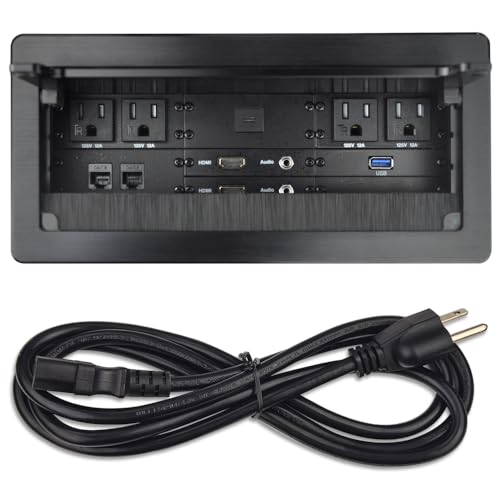
Designed for desk surfaces, this unit presents a compact footprint with 4 AC outlets, 2 USB‑C/USB‑A ports, and two HDMI and RJ45 slots. The metal construction ensures durability in high‑traffic conference areas. The panel measures about 10.47 by 5.12 inches, offering substantial connectivity without overwhelming the tabletop space.
Key considerations: HDMI and USB ports support multimedia sharing and device charging in one location, simplifying room setup. The flush‑mount style helps maintain a clean, professional appearance on conference tables with frequent use.
Kungfuking Conference Table Power Hub

UL Listed and rated for 125V/12A/1500W, this 7‑in‑1 hub includes HDMI, RJ45, 3 USB ports, and 2 AC outlets. The 20W USB‑C PD port and additional USB‑A ports support rapid charging for multiple devices. A sturdy 6‑ft power cord keeps outlets accessible while preventing cable strain during meetings.
Key considerations: UL certification enhances safety in shared spaces. The combination of multimedia ports and high‑power USB charging makes it suitable for boardrooms that rely on HDMI displays, network access, and device charging in one centralized unit.
BTU Desk Power Grommet with 35W USB‑C

This compact desk grommet fits into various desk types, including conference tables, providing 35W USB‑C PD charging and two USB‑A ports for quick devices topping. It also includes HDMI output for easy screen sharing and a pair of AC outlets for essential peripherals. The design helps keep cables tucked away and the desk surface uncluttered.
Key considerations: drill installation makes this option accessible for many table designs. The mix of PD charging, USB ports, and HDMI supports a range of office workflows, from note taking to screen projection during meetings.
Buying Guide: Choosing the Right Conference Table Outlet
- Port variety and charging power: For mixed devices, prioritize hubs with USB‑C PD charging (20W–65W) and multiple USB‑A ports. HDMI and RJ45 can be valuable for meetings requiring displays and wired networks.
- Installation style: Pop‑up outlets save surface space but require table cores with suitable depth. Recessed and flush mounts reduce clutter while staying visible and accessible. Grommets fit most desktop surfaces with a simple drill cut.
- Durability and safety: Look for UL/ETL listings for electrical safety and durable materials like aluminum or reinforced plastics. A sturdy power cord and anti‑tap features help withstand daily use in busy conference rooms.
- Aesthetics and fit: Black or metallic finishes blend with modern office furniture. A low‑profile panel or flush install keeps the tabletop clean for collaborative work.
- Future‑proofing: Choose hubs with modular ports or upgrades, such as USB‑C PD and HDMI, to accommodate evolving devices and external displays in boardrooms and training spaces.
Usage Scenarios: How to Select by Room Type
For small to medium conference rooms, a pop‑up hub with PD charging and USB ports (like JACEPFY) offers quick accessibility and a tidy surface. Medium to large rooms may benefit from a recessed or flush configuration (JS VI DEO JS TECHNOLOGY or SXMFFHCG) to support multiple devices without crowding the table. Rooms with frequent multimedia presentations might prioritize HDMI and RJ45 provisions (Kungfuking or SXMFFHCG). Finally, desks that double as collaborative spaces can lean toward a grommet option (BTU) for flexible, surface‑level connectivity with simple installation.
All selected products aim to deliver reliable power and data connections while maintaining a clean, professional conference environment. When evaluating options, assess your table thickness, the number of devices typically used, and whether you need data ports in addition to power and USB charging.