Best Ergonomic Chairs With Adjustable Arms for Home Offices
The best ergonomic chair with adjustable arms is one that lets you position your elbows comfortably while matching your back and seat to your body. HUANUO is best for extensive armrest adjustment, HOLLUDLE for adjustable lumbar support and a three-direction armrest, and Ergoa for padded 4D arms and flip-up flexibility. The options below compare armrest movement, back support, and useful adjustments so you can choose a chair for your workspace and sitting habits.
| Chair | Armrest adjustment | Best for |
|---|---|---|
| HUANUO | 6D | Extensive positioning options |
| HOLLUDLE | 3D | Adjustable lumbar support |
| Ergoa | 4D, padded, flip-up | Soft arm support and flexibility |
| Marsail High-Back Mesh | 3D | Airflow and adjustable back support |
| SUNNOW | Height-adjustable, flip-up | Compact desk storage |
HUANUO Chair With 6D Armrests
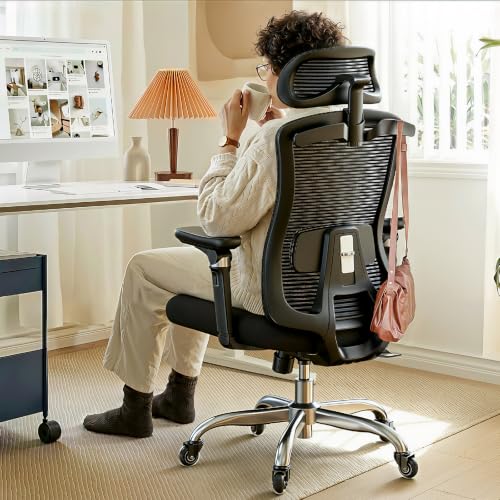
Best for: People who want many ways to position their armrests for desk work, reading, or gaming. The armrests move up and down, forward and back, in and out, tilt, and rotate. This broad range makes the chair a strong choice when fixed or height-only arms do not fit your preferred posture.
The chair also has height-adjustable lumbar support, seat-depth adjustment, a 3D headrest, a contoured cushion, and breathable mesh across the seat and back. These features provide more fit options beyond the arms. A limitation is that the extensive adjustments may be unnecessary for buyers who only need arms that move vertically.
HOLLUDLE Chair With 3D Armrests

Best for: Buyers who want to adjust both their arm support and lumbar position. Its 3D armrests move vertically and forward or backward, and they rotate. The lumbar support adjusts up and down, forward and backward, and by rotation, allowing more than a simple height change.
The mesh chair also includes a 2D headrest and a three-level tilt lock. Its V-shaped back gives it a distinctive look for a home office. Choose this model if lumbar customization matters alongside arm movement. Its armrests are 3D, not 4D or 6D, so buyers seeking the widest possible range should compare it with HUANUO or Ergoa.
Ergoa Chair With Padded 4D Arms

Best for: People who prefer padded armrests with several adjustment directions. The 4D arms move up and down, inward and outward, forward and back, and rotate 45 degrees. The chair also has an eight-position lumbar adjustment and a backrest with multiple height positions.
Its removable 3D headrest has 11 positions, and the product description notes a built-in hanger. The combination suits buyers who want to fine-tune arm, back, and head support or remove the headrest when preferred. The available product details do not specify the amount of weight the armrests support, so avoid assuming they are designed to bear body weight.
Marsail High-Back Mesh Chair With 3D Arms

Best for: Buyers who want adjustable armrests and lumbar support in a breathable mesh-back chair. Its 3D arms adjust for different work postures. The lumbar system moves forward and backward as well as up and down, so users can adjust its position rather than relying on a fixed support point.
The chair also has a 2D headrest and a backrest that reclines from 90 to 120 degrees. Choose it if airflow and lumbar positioning are priorities. The listed recline range is narrower than the 90-to-130-degree range of the separate Marsail model with height-adjustable arms, so compare recline needs before choosing.
SUNNOW Chair With Flip-Up Arms

Best for: Buyers who need basic arm-height adjustment and a way to tuck the chair beneath a desk. Its arms adjust in height and flip up 90 degrees, which can help save space when the chair is not in use or when a desk requires a lower profile.
The chair has a wide W-shaped seat with high-density memory foam and a bionic S-curve design. These features may appeal to users who prefer a cushioned seat over a mesh seat. Its arms are less adjustable than the 3D, 4D, or 6D options above, so choose another model if you need forward-and-back or rotational arm positioning.
Buying Guide: How to Choose an Ergonomic Chair With Adjustable Arms
Which armrest adjustment level do you need?
Start with the movement that will solve your main fit issue. Height adjustment changes where your elbows rest. Forward-and-back movement helps position the armrests relative to your desk and torso, while inward-and-outward movement changes their spacing. Rotation and tilt offer additional ways to align the support with your arm position. More adjustment directions do not automatically mean a better fit; they matter when you will use them.
Should you choose 3D, 4D, or 6D arms?
Descriptions can vary by manufacturer, so compare the listed movements rather than relying on the label alone. The Marsail and HOLLUDLE options offer 3D arms. Ergoa lists padded 4D arms with several directional adjustments, while HUANUO lists six types of movement. SUNNOW focuses on height adjustment and flip-up storage.
What other chair adjustments should you compare?
Check whether the lumbar support moves, whether the seat depth adjusts, and whether the backrest reclines or locks. A headrest can matter if you want neck support, while breathable mesh may suit buyers who prefer airflow. Confirm that the chair’s listed dimensions and adjustment ranges suit your desk and body; the product descriptions do not provide every measurement.
Will flip-up arms fit under your desk?
Flip-up arms can make a chair easier to tuck away, but confirm your desk clearance and the chair’s overall dimensions before purchasing. If you rest your elbows on the armrests throughout the workday, prioritize a comfortable height and useful positioning range over storage alone.
Frequently Asked Questions
What does “adjustable armrest” mean?
It means at least one armrest position can be changed, commonly its height. Some chairs also let you move the arms forward or backward, change their width, tilt them, or rotate them.
Are 4D armrests better than height-adjustable arms?
They offer more kinds of adjustment, but they are not automatically better for every buyer. Height-adjustable arms may be sufficient if you only need to align elbow support with your desk.
Are flip-up armrests useful for small workspaces?
They can help a chair tuck under a desk or move out of the way. Check the desk clearance and chair dimensions to confirm the design suits your space.
Should lumbar support be adjustable too?
Adjustable lumbar support can help you position the support point to suit your back. Compare the specific movement directions and ranges listed for each chair.
Can adjustable armrests replace proper desk setup?
No. They are one part of chair fit. Desk height, seat position, and the placement of your keyboard and mouse also affect whether your arms rest comfortably while working.