Best Flip Up Keyboard Trays for Space-Saving Workstations
The best flip-up keyboard tray depends on your available wall space, preferred tray width, and whether you need a wrist rest or room for a mouse. The VIVO 24-inch model is a straightforward choice for standard keyboards, while the PUTORSEN and Putilsen Mount trays add a wrist rest and support a laptop up to 16 inches. For a wider platform, consider VIVO’s 30-inch model; for a higher stated weight capacity and added safety features, consider ROMILTON.
| Product | Best For | Standout Feature |
|---|---|---|
| VIVO 24-Inch Black | Basic keyboard-and-mouse setup | Multiple listed mounting surfaces |
| Putilsen Mount 24-Inch | Wrist support and laptop use | Stated capacity of 22 pounds |
| PUTORSEN 24-Inch | Wider typing platform | 12-inch tray with wrist rest |
| VIVO 30-Inch | More side-to-side space | 30-inch-wide platform |
| ROMILTON 24-Inch | Added safety and accessories | Magnetic closure and pinch-prevention design |
VIVO Black 24-Inch Flip-Down Tray

Best for: People who want a simple wall-mounted platform for a full-sized keyboard and mouse. The tray measures 23.6 by 7.9 inches and is designed to mount beneath a monitor for a standing workstation.
Its low-profile folding design lets the platform fold up when it is not in use, helping free workspace. VIVO lists installation options for drywall, wood studs, and concrete or brick, with instructions and hardware for the mounting options. That flexibility makes it a practical pick for offices and other work areas where a wall-mounted setup is preferred.
Limitation: The 7.9-inch depth may be restrictive if you want extra room beyond a keyboard and mouse. Choose another option if you need a wider typing surface or wrist rest.
Putilsen Mount 24-Inch Tray
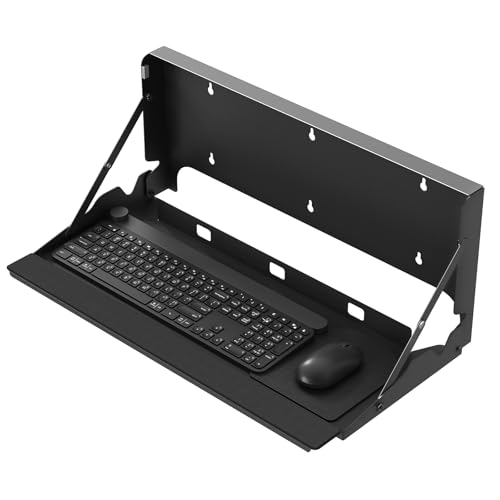
Best for: Buyers seeking a fold-up tray with a wrist support and stated laptop compatibility. The product information says it holds a standard keyboard or a laptop up to 16 inches, as well as a keyboard and mouse.
The steel construction is described as supporting up to 22 pounds, and the tray has an extra-wide design with a wrist support. It folds against the wall when not in use, making it a space-conscious option for a home office or studio. It was selected for buyers who want more than a basic flat keyboard platform.
Limitation: The listing does not give the tray’s exact width and depth. Check the product dimensions before choosing it for a particularly tight installation area.
PUTORSEN 24-Inch Tray With Wrist Rest

Best for: Users who want more front-to-back room and a wrist rest. PUTORSEN lists a 12-inch-deep vented tray designed for a standard keyboard and mouse, plus compatibility with a laptop up to 16 inches.
The steel platform is listed with a 22-pound load capacity. Its fold-down construction helps clear the work area when typing is finished, while the wrist-rest design is intended to support a more comfortable typing position. Compared with the VIVO 24-inch tray, this is the better fit when added depth and wrist support are priorities.
Limitation: A deeper tray takes up more space when unfolded. Measure the area beneath the monitor and check that the platform will not obstruct nearby furniture or movement.
VIVO Black 30-Inch Flip-Down Tray

Best for: Buyers who need more side-to-side space than a 24-inch platform provides. VIVO lists a 30-by-7.9-inch surface for a full-sized keyboard and mouse, intended for mounting beneath a monitor.
Like the smaller VIVO model, this tray folds up when it is not needed. The provided installation instructions and hardware cover drywall, wood studs, and concrete or brick surfaces. Choose this model if your workspace can accommodate its longer width and you prefer a simple folding platform.
Limitation: It is wider than the 24-inch alternatives but has the same listed 7.9-inch depth. It may not suit a setup that needs extra front-to-back room or a wrist rest.
ROMILTON 24-Inch Tray With Wrist Rest

Best for: Users who want a wrist rest and additional folding features. The 24-inch tray has an 8-inch platform plus a 2-inch wrist-rest area, and the listing states that it supports over 30 pounds.
ROMILTON describes a thickened steel construction, powder-coated finish, magnetic closure, and finger-pinch prevention design. The package is listed as including an expansion bolt set for wood, concrete, or tile surfaces, along with a leather mouse pad and pen holder. These details make it a feature-rich option for a home office or studio.
Limitation: The stated capacity is the manufacturer’s listed figure; confirm that the mounting surface and installation suit your intended setup. Follow the supplied instructions rather than relying on the capacity alone.
Buying Guide: How To Choose A Flip-Up Keyboard Tray
What tray size should you choose?
Start by measuring the keyboard, mouse, and available wall area. A 24-inch tray is a common choice for a standard keyboard-and-mouse arrangement. A 30-inch platform offers more width, while the PUTORSEN model’s listed 12-inch depth provides more front-to-back room. Compare the product dimensions with your monitor position and nearby furniture before buying.
Do you need a wrist rest or laptop support?
Choose a model with a wrist rest if that feature matters to your typing setup. The Putilsen Mount, PUTORSEN, and ROMILTON listings specify wrist support. Putilsen Mount and PUTORSEN also state that their trays can hold a laptop up to 16 inches. Confirm your laptop’s size and the product’s usable surface before relying on it as a laptop platform.
How should you check the mounting requirements?
Identify the wall material and follow the product’s installation instructions. VIVO lists hardware and instructions for drywall, wood studs, and concrete or brick. ROMILTON lists an expansion bolt set for wood, concrete, or tile. Do not assume every tray includes hardware suitable for every wall; verify the supplied parts and installation guidance for your surface.
How important is the folded profile?
All five selected options fold away when not in use. Compare the unfolded dimensions and the space needed for the tray to open and close. If a room is especially narrow, measure the movement area as well as the wall space. Keep fingers clear of hinges during operation, even when a product describes a pinch-prevention feature.
Frequently Asked Questions
What is a flip-up keyboard tray?
It is a keyboard platform that mounts to a wall and folds up when it is not in use. This design helps clear the area below the monitor or work surface.
Can a flip-down wall tray hold a laptop?
Some can. Putilsen Mount and PUTORSEN list support for a laptop up to 16 inches. Check the tray dimensions and product instructions before using a laptop on it.
Will a wall-mounted keyboard tray fit any wall?
Not necessarily. Mounting hardware and instructions vary by product and wall type. Check the listing and installation guidance for compatibility with your wall material.
Is a wider tray always better?
No. A wider tray can provide more side-to-side room, but it also needs more wall space. Match the tray width and depth to your keyboard, mouse, and installation area.
What should I measure before ordering?
Measure your keyboard and mouse together, the available wall width and depth, and the space needed to fold the tray up. Also check the mounting surface and listed installation requirements.