Best Full Motion TV Mounts for Flexible Viewing
The best full motion TV mount depends on your TV’s size, weight, VESA pattern, wall type, and how far you need the screen to move. The USX MOUNT 32–70-inch model suits many standard-size TVs, while the Mounting Dream mount offers greater extension and installation adjustments. For corner placement, consider the ELIVED long-arm mount or Perlegear’s 37–75-inch model. Larger TVs may be better suited to Perlegear’s heavy-duty 42–90-inch mount.
| Mount | Best for | Key feature |
|---|---|---|
| USX MOUNT 32–70 | Everyday viewing flexibility | 13.89-inch extension; supports up to 99 lbs |
| Mounting Dream 32–70 | Extra reach and easier alignment | 17.5-inch extension; post-install leveling |
| ELIVED 26–65 | Corner positioning | 37.4-inch extension |
| Perlegear 37–75 | Corner setups with a larger TV | 32.37-inch extension; up to 100 lbs |
| Perlegear 42–90 | Large, heavy TVs | Supports up to 132 lbs |
USX MOUNT 32–70-Inch Full Motion Mount

Best for: Viewers who want to swivel and tilt a standard-size TV, with room to pull it away from the wall. It fits most 32–70-inch TVs weighing up to 99 pounds and supports VESA patterns from 75 x 75mm to 400 x 400mm.
Its dual articulating arms extend up to 13.89 inches and retract to 2.59 inches. The mount tilts from -12° to +5° and swivels left or right to help position the screen for different seating locations. The listed wall options include 12- or 16-inch wood studs, concrete, and brick.
It was selected as a versatile option for common TV sizes and multiple wall types. Check first: Confirm your TV’s weight, VESA pattern, and wall construction before purchasing; the mount is not a fit for every TV or installation.
Mounting Dream 32–70-Inch Full Motion Mount

Best for: Buyers who want more extension and a way to fine-tune the screen’s level after installation. This mount fits most 32–70-inch TVs up to 99 pounds, with a maximum VESA pattern of 400 x 400mm.
It extends 17.5 inches from the wall and retracts to 3.4 inches. The tilt range is +5° upward and -15° downward, and the product information specifies swiveling left or right. Installation features include pre-labeled hardware bags, a paper template, and +/-3° post-installation leveling adjustment.
Its longer reach and leveling adjustment make it a useful comparison with the USX MOUNT option. Check first: This model is designed for standard 16-inch studs. The product information points shoppers with wider stud spacing to a different model.
ELIVED 26–65-Inch Long Arm TV Mount
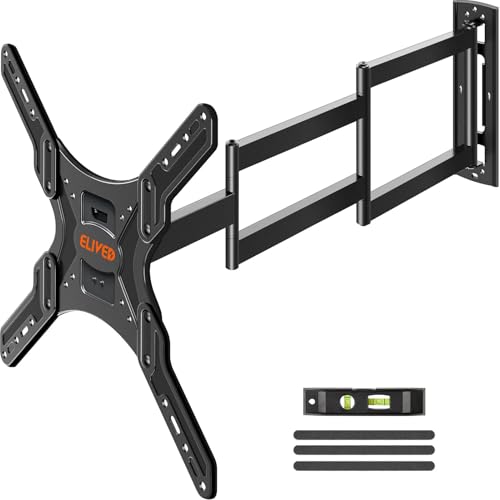
Best for: Corner placements and rooms where the TV needs to reach multiple viewing positions. Its arm extends 37.4 inches and retracts to 3 inches, providing substantially more reach than the shorter-arm options in this selection.
The mount fits most 26–65-inch TVs weighing up to 77 pounds, with VESA patterns from 100 x 100mm to 400 x 400mm. It swivels up to 90° left or right, tilts +5°/-15°, and includes +/-3° screen-level adjustment.
This model was selected for its long extension and stated corner-use design. Check first: Its 77-pound capacity and 65-inch maximum screen size make it less suitable for larger or heavier TVs. Verify the TV’s VESA pattern and input access before buying.
Perlegear 37–75-Inch Corner TV Mount

Best for: People mounting a mid-size or larger TV in a corner who need a long reach. It supports TVs from 37 to 75 inches weighing up to 100 pounds and fits VESA patterns from 200 x 100mm to 600 x 400mm.
The arm extends 32.37 inches and retracts to 3.12 inches. The mount swivels +/-90° and tilts -15° to +5°; the tilt is described as tool-free. It also provides +/-4° post-installation leveling. Listed wall types include wood studs, concrete, and brick.
Its combination of a 75-inch screen limit and long extension makes it a better fit for corner viewing than the more compact mounts above. Check first: Do not install it on drywall alone. Confirm the wall type and TV specifications before mounting.
Perlegear 42–90-Inch Heavy-Duty TV Mount

Best for: Larger, heavier TVs that exceed the size or weight limits of the other picks. It fits most 42–90-inch flat and curved TVs, supports up to 132 pounds, and accepts VESA patterns from 200 x 100mm to 600 x 400mm.
The mount is listed for 8-, 12-, or 16-inch wood studs, concrete, and brick. Its viewing adjustments include +/-50° swivel, +5°/-15° tool-free tilt, and +/-3° post-installation leveling. The product description also lists security locks, anti-drop edges, and a reinforced wall plate.
It was selected for shoppers prioritizing a higher stated weight capacity and support for larger screens. Check first: For studs spaced 24 inches apart, the product information says an extension bracket may be needed; confirm the installation requirements before purchase.
Buying Guide: How To Choose A Full Motion TV Mount
Will the mount fit my TV?
Compare four specifications before choosing: screen size, TV weight, VESA pattern, and wall type or stud spacing. VESA is the distance between the mounting holes on the back of the TV, usually stated in millimeters. A mount’s advertised screen-size range alone does not confirm compatibility.
How much extension do I need?
Choose a shorter arm if the TV mainly needs to angle toward nearby seats. More extension can help when the screen must move around a corner or face different areas of an open room. Compare both the maximum extension and the retracted distance, since a mount’s position against the wall affects how far it projects when not in use.
What do tilt and swivel do?
Swivel turns the TV from side to side, while tilt angles it up or down. These adjustments can help direct the screen toward seating or reduce glare. Check the listed range, but note that the TV’s size and its position on the arm may affect the available swivel angle.
Which wall types can support a mount?
Use only the wall materials and stud spacing specified for the selected mount. Some products allow installation on wood studs, concrete, or brick, but hardware and installation methods can differ. Do not mount a TV bracket to drywall alone unless the product instructions explicitly allow it. If wall construction is uncertain, consult a qualified installer.
How should I compare weight limits?
Make sure the TV’s weight is within the mount’s stated capacity and check that the VESA pattern also matches. For a large or heavy screen, the Perlegear 42–90-inch model has the highest listed capacity in this guide. Do not assume a mount is suitable based on screen size alone.
Frequently Asked Questions
What is a full motion TV mount?
A full motion mount uses an articulating arm to let a mounted TV swivel and tilt. Many models also extend away from and retract toward the wall.
Can I put a full motion TV mount in a corner?
Yes, a long-arm model can help position a TV in or near a corner. Check its extension, swivel range, wall requirements, and TV compatibility before installation.
Does a full motion TV mount fit every TV?
No. The TV must fall within the mount’s supported weight and size range, and its VESA pattern must match. Wall type and stud spacing also matter.
Can I install a TV mount on drywall alone?
Do not install these listed mounts on drywall alone. Follow the specific product instructions for approved wall materials and anchoring.
Is more arm extension always better?
No. A long arm is useful when the TV needs to reach around a corner or serve multiple viewing areas. A shorter arm may be preferable when the screen stays closer to one position.