Best Gaming Computer Table Designs for Different Setups
The best gaming computer table design depends on your available space, equipment, and storage needs. The Korfile 47-inch desk suits players who want drawers and a monitor stand, while the Lufeiya 32-inch model is a compact choice. For corner setups, consider the ODK 53-inch L-shaped desk or Korfile 66-inch L-shaped desk. The AODK 59-inch desk is designed for showcasing a panoramic PC case.
| Desk | Best For | Standout Feature |
|---|---|---|
| Korfile 47-Inch | Storage and monitor placement | Five drawers and monitor stand |
| Lufeiya 32-Inch | Compact rooms | Small footprint and built-in power |
| ODK 53-Inch L-Shaped | Corner workstations | Shelves, CPU stand, and cable channels |
| AODK 59-Inch | Showcase PC builds | Elevated PC display stand |
| Korfile 66-Inch L-Shaped | Large multi-purpose setups | Storage drawers and adjustable LED lighting |
Korfile 47-Inch Desk With Drawers

Best for: Gamers who want storage and a raised monitor position in a mid-size desk. This Korfile design combines a monitor stand with five non-woven fabric drawers, helping separate desktop equipment from smaller accessories.
The listed features include three AC outlets, two USB charging ports, and an RGB strip with 22 lighting effects. The drawers have four flexible mounting options, so the arrangement can be adapted to different room layouts. The monitor stand is intended to raise the screen for a more comfortable viewing position.
Why it stands out: It combines power access, lighting, a monitor stand, and substantial small-item storage in one design. Limitation: The drawers are fabric rather than rigid, and the desk is 47 inches wide, so buyers with large multi-monitor setups should check their measurements first.
Lufeiya 32-Inch Compact Gaming Desk
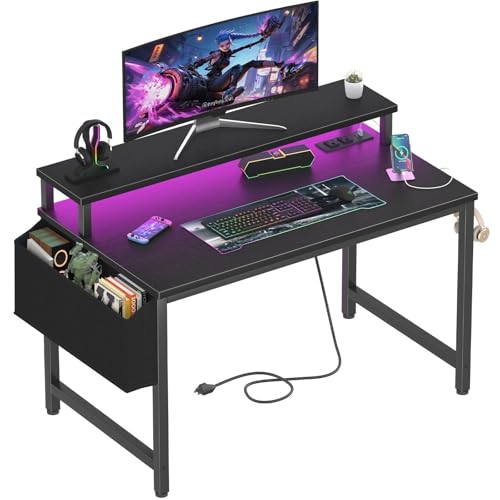
Best for: A small bedroom, study area, or gaming corner where floor space is limited. At 32 inches, this is the most compact option in this selection. Its monitor stand, storage bag, and two removable headphone hooks add organization without relying on a large desk footprint.
The desk includes a power strip with two AC outlets and two USB ports. Its RGB lighting offers seven adjustable colors, four dynamic modes, and 16 static types. The listed desktop material is thick particle board with a scratch-resistant, anti-collision, and waterproof surface.
Why it stands out: It provides basic gaming conveniences in a compact format. Limitation: The smaller desktop may not suit users who need room for multiple monitors, large peripherals, or extensive writing space.
ODK 53-Inch L-Shaped Gaming Desk

Best for: Players who want to use a room corner and keep accessories organized. This L-shaped design includes dual shelves, a CPU stand, an accessory hook, and a tool bag. Cable-management channels help route cords around the workstation.
Power features include three AC outlets and two USB ports. Its adjustable RGB lighting has 10 color presets, eight brightness grades, 10 dynamic modes, and a memory function. The layout is described for gaming, home office work, and study use.
Why it stands out: The shelves and CPU stand add storage options while the corner shape makes use of a room area that might otherwise go unused. Limitation: Measure the corner and confirm which side configuration suits your room before choosing an L-shaped desk.
AODK 59-Inch PC Showcase Desk

Best for: Builders who want a panoramic-style PC case to be a visible part of the setup. The elevated desktop stand is designed to display a tempered-glass case at eye level rather than hide the computer below the desk.
An RGB strip beneath the monitor shelf is intended to complement lighting inside a PC. Three fabric drawers provide storage for accessories, cables, and controllers, keeping the main surface less crowded.
Why it stands out: Its defining feature is the dedicated elevated PC display area, paired with drawers for clutter control. Limitation: The design is specifically oriented toward showing off a PC case, so it may be less suitable for buyers who prefer the computer tucked out of sight. Check case dimensions and the stand’s available space before purchasing.
Korfile 66-Inch L-Shaped Desk

Best for: Users who need a larger corner workstation for gaming, studying, and everyday computer tasks. The desk has two fabric drawers, a sliding CPU shelf, and two headphone hooks. These storage features can help move accessories and equipment off the main work surface.
The integrated power station includes three AC outlets and two USB ports. Its LED strip offers 20 color options, 22 dynamic scenes, and five brightness settings, providing more lighting choices than a simple single-color accent strip.
Why it stands out: It combines an L-shaped work area with storage, a CPU shelf, hooks, power, and adjustable lighting. Limitation: Its 66-inch format requires more room than compact or straight desks; measure the intended corner and surrounding clearance before buying.
Buying Guide: How To Choose A Gaming Desk Design
How much desk space do you need?
Start by measuring the available wall or corner area, including space for the chair and room to move. A compact 32-inch desk is suited to limited spaces, while larger L-shaped designs offer more surface area but need a compatible corner. Consider monitor stands, PC placement, and peripheral dimensions—not only the width of the tabletop.
Should you choose a straight or L-shaped desk?
A straight desk can be easier to place along a wall and may suit a single-monitor setup. An L-shaped desk can provide separate areas for gaming, schoolwork, or other tasks. Before selecting one, check whether shelves or drawers can be installed on the side that works with your room layout.
Which storage and power features matter?
Drawers, shelves, hooks, and CPU stands help organize different kinds of gear. Built-in outlets and USB ports can make device charging more convenient, but they do not replace checking the location and capacity of your available wall power. Cable-management channels or a dedicated CPU shelf may be useful if cord routing and floor clearance are priorities.
Do RGB lights or a monitor stand make a difference?
RGB lighting is an appearance feature; compare the listed colors, modes, and brightness controls if customization matters. A raised monitor stand changes screen placement and can free up some desktop area. Choose based on your equipment and preferred viewing setup, and check the product dimensions to confirm the stand fits your monitor.
Frequently Asked Questions
What is the best gaming desk design for a small room?
A compact straight desk is often easier to fit in a small room. The 32-inch Lufeiya is the smallest option listed here, while an L-shaped desk may work if the room has a suitable corner.
Are L-shaped gaming desks better for multiple tasks?
They can provide separate work zones and corner storage, but suitability depends on room dimensions and the desk’s layout. Measure the space and check the orientation before choosing.
Do gaming desks with built-in outlets need cable management?
Built-in outlets reduce the need to reach a separate power strip, but cords still need routing. Look for cable-management channels or plan how device cables will run to the desk.
What should I check before buying a desk with a PC stand?
Compare the PC case’s dimensions with the desk’s listed stand space and consider where the stand places the computer. Product descriptions may not establish fit for every case model.
Is a monitor stand necessary for a gaming desk?
No. It can raise the screen and create space beneath it, but whether that placement suits you depends on your monitor and preferred setup. Check the stand dimensions before purchase.