Best Keyboard Tray Pole Mounts for Ergonomic Workstations
This guide highlights top keyboard tray pole mounts designed to maximize comfort, reduce strain, and keep desks clutter-free. Whether you need a full motion arm, a sturdy pole clamp, or a sit-stand integration, these options offer versatile placement, easy rotation, and cable management to fit common poles and desks. Read on to compare key features and choose the best pole-mounted keyboard tray for your setup.
| Product | Brand | Key Benefit | Link |
|---|---|---|---|
| VIVO Universal 26 Inch Keyboard and Mouse Tray Pole Mount | VIVO | 360° rotation; fits poles 1.1”–2.4” | Amazon |
| Keyboard Tray Pole Mount – PUTORSEN | PUTORSEN | 25.7” x 9.3” tray; full 360° rotation | Amazon |
| PUTORSEN Sit Stand Monitor Desk Mount | PUTORSEN | Sit-stand with keyboard tray; adjustable tilt | Amazon |
| Mount-It! Keyboard Wall Mount with Pole Option | Mount-It! | Wall or pole mounting; full motion | Amazon |
| VIVO Sit-Stand 24 Inch Pneumatic Tray Clamp-on | VIVO | Pneumatic height adjust; wall monitor integration | Amazon |
VIVO Universal 26 Inch Keyboard and Mouse Tray Pole Mount

The VIVO pole mount is designed to fit poles with diameters from 1.1” to 2.4”, enabling flexible installation on compatible monitor stands, walls, or poles. The tray extends up to 17” from the wall, providing a broad surface for keyboard and mouse placement. Its +90° to -90° tilt supports ergonomic typing angles and can rotate a full 360°, allowing easy access and alternation between seating and standing work positions. cable management clips help maintain a clean look by routing cords along the arm.
Keyboard Tray Pole Mount – PUTORSEN

PUTORSEN offers a universal pole mount with a spacious 25.7” x 9.3” tray to accommodate standard and oversized keyboards, plus space for a mouse. The mount supports poles from 1.1” to 2.4” in diameter and includes raised edges to prevent accidental keyboard slips. Two articulating arms deliver broader adjustment, including tilt from +90° to -90° and 360° rotation. An arm extension of about 10.6” provides an extended reach, and cable clips keep cords neatly managed. The design includes wrist padding for added comfort and keyboard protection with optional keyboard pads.
PUTORSEN Sit Stand Monitor Desk Mount

This mount combines sit-stand capability with a keyboard tray, offering pneumatic or spring-assisted transitions between seated and standing work modes. The integrated keyboard tray includes a padded wrist rest to reduce strain, and built-in cable management keeps wires organized along the steel and aluminum frame. Fully adjustable: tilt -35° to +35°, 180° swivel, 360° rotation for both monitor arm (up to 9 kg) and keyboard tray (up to 1 kg). The setup supports flexible viewing angles and ergonomic typing across varying tasks.
Mount-It! Keyboard Wall Mount with Pole Option

This wall-mounted keyboard and mouse solution can also be mounted on a pole, saving desk space and reducing clutter. The spring-assisted arm extends up to 21.8” and tilts up to 85°, with a 90° swivel for flexible positioning. It supports a roomy platform that can hold both a keyboard and mouse, and it can be converted to a monitor mount with VESA compatibility for screens up to 32”. The design emphasizes ergonomic reach and clean cable organization.
VIVO Sit-Stand 24 Inch Pneumatic Tray Clamp-on

This clamp-on solution integrates with compatible wall monitor mounts to create a floating workstation. It supports up to 11 lbs, with wood stud and concrete/brick mounting options. The pneumatic height adjustment and integrated cable management help maintain a tidy workspace. The tray offers ergonomic tilt and provides a reliable platform for keyboard and mouse while standing or sitting, enhancing long-term comfort.
VIVO Sit-Stand Height Adjustable Pneumatic Spring Arm Desk Mount

Designed for desks with support for 17” to 32” screens and up to 17.6 lbs, this stand uses a pneumatic spring to transition between seated and standing workstations. The arm offers -35° to +35° tilt, 180° swivel, and 360° rotation for both monitor and keyboard tray. A built-in cable management system keeps cords organized along the frame, delivering a clean aesthetic and efficient workflow.
Mount-It! Full Motion Under Desk Keyboard Tray

This under-desk keyboard tray places the keyboard and mouse closer to the body for reduced wrist strain and improved posture. Height and tilt adjustments allow up to 5.5” of vertical movement and tilt range of +20° to -25°. The tray is compatible with desks with sufficient mounting space and depth, focusing on ergonomic alignment for extended use and gaming sessions. It’s a practical option for compact, clutter-free workstations.
MOUNT-IT! Sit Stand Monitor Desk Mount
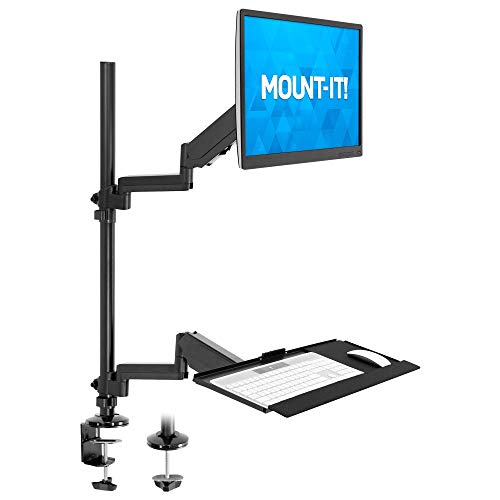
This full-motion monitor desk mount includes a keyboard tray and robust cable management. It supports 32″ screens with full motion adjustments, including pneumatic springs for standing transitions. The integrated keyboard tray provides a padded wrist rest to reduce strain, while the monitor arm swivels, tilts, and rotates for optimal viewing angles. Ideal for dynamic workstyles in modern offices or gaming setups.
Buying Guide: Key Purchase Considerations
- Pole compatibility: Check diameter range (usually 1.1”–2.4”) and whether your pole or monitor stand supports both keyboard and monitor integration.
- Motion range: Consider tilt, swivel, and rotation needs. Full 360° rotation and -90° to +90° tilt enable flexible positioning and alternate typing angles.
- Weight capacity: Ensure the tray and arm can support your keyboard, mouse, and any wrist rests without sagging.
- Arm reach and clearance: Measure wall or desk clearance when extended. A longer reach helps reduce strain but may require more space.
- Cable management: Look for built-in clips or channels to keep cords organized and out of the way.
- Ergonomic features: Wrist rests, raised edges on trays, and padding improve comfort during long sessions.
- Compatibility with existing gear: If you already have a monitor arm, verify compatibility or look for a model that can be adapted to pole mounting.
- Installation and adjustability: Some models include multiple mounting options (wall, pole, desk), while others are optimized for specific setups. Consider ease of assembly and future reconfiguration.
- Desk and space constraints: Under-desk trays save space but require adequate clearance beneath the desk; wall and pole mounts free vertical space.