Best Long Arm Monitor Wall Mounts for Clutter-Free Desks and Flexible Viewing
Finding a long arm monitor wall mount that blends sturdy support with easy adjustability can transform any workspace. The selections below focus on long-extension arms, full-motion capability, and reliable VESA compatibility to fit most 13 to 57-inch screens. Each option balances space-saving design with ergonomic adjustability, helping you customize height, tilt, swivel, and rotation for comfort during work or gaming sessions.
| Product | Brand | Arm Length | Weight Capacity | VESA |
|---|---|---|---|---|
| MOUNT PRO Monitor Wall Mount | MOUNT PRO | Up to 25.67″ extended | 17.6 lbs | 100×100 |
| ErgoFocus Long Arm Monitor Wall Mount | ErgoFocus | 27.97″ extended | 17.6 lbs | 75×75 / 100×100 |
| ARES WING Monitor Wall Mount (Ultrawide) | ARES WING | Long arm with gas spring | 60 lbs | 75×75 / 100×100 |
| MOUNTUP Monitor Wall Mount | MOUNTUP | Up to 27.59″ extension | 2.2–33.1 lbs | 75×75 / 200×200 |
| ELIVED Long Arm TV Wall Mount | ELIVED | 21.7″ extension | 44 lbs (TVs) | 100×100 – 400×400 |
MOUNT PRO Monitor Wall Mount
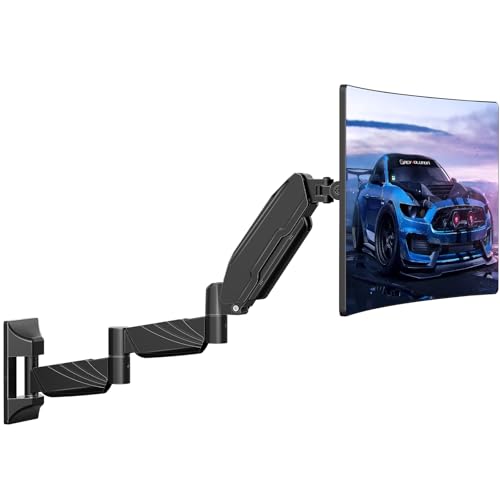
The MOUNT PRO wall mount offers an extra-long arm that extends up to 25.67 inches and retracts to 3.17 inches, ideal for corner setups and flexible viewing angles. It provides full motion with 360-degree rotation, +90°/-45° tilt, and +/-90° swivel to accommodate both landscape and portrait orientations. Pneumatic springs support easy height adjustment to counterbalance monitor weight, helping users quickly find an optimal position. Cable management helps maintain a tidy, desk-free workspace.
ErgoFocus Long Arm Monitor Wall Mount
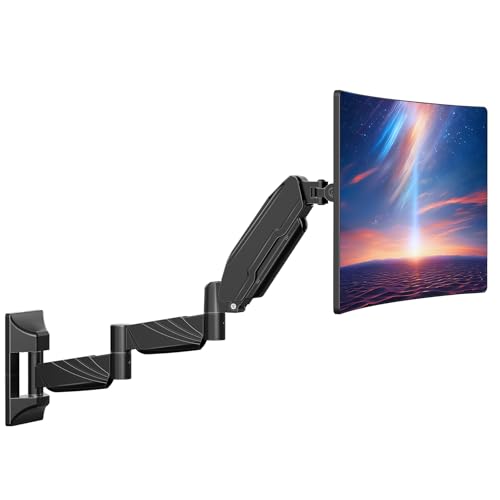
ErgoFocus emphasizes desk-space efficiency with a 27.97-inch arm length, enabling substantial reach while freeing desktop area. It supports screens from 17 to 32 inches and accommodates weights from 4.4 to 17.6 pounds. The mount covers VESA 75×75 and 100×100 patterns and offers full-motion flexibility: 360-degree rotation, +90°/-45° tilt, and +/-90° swivel for versatile screen positioning. Its design targets both home offices and small workspaces seeking ergonomic comfort.
ARES WING Ultrawide Monitor Wall Mount
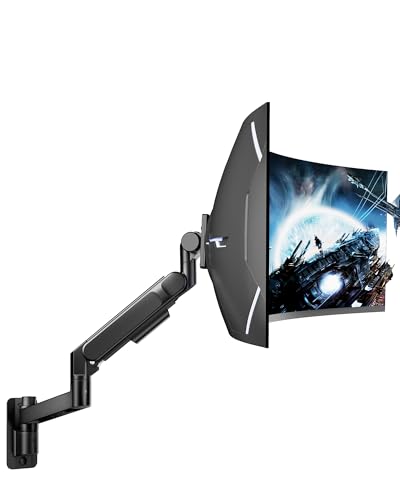
ARES WING delivers heavy-duty support for ultrawide and large gaming monitors up to 57 inches and 60 pounds. The mounted arm employs a bearing head for smooth tilt adjustments, reducing effort when tilting heavy displays. It provides full motion with +60° to -20° tilt, ±90° swivel, and ±90° rotation. The single-arm design accommodates wide-ranging movement and ergonomic customization, helping minimize neck and back strain during extended sessions.
MOUNTUP Monitor Wall Mount

Designed for 22–43 inch screens, MOUNTUP supports heavy loads up to 33.1 pounds with a versatile VESA range from 75×75 to 200×200 mm. The arm extends up to 27.59 inches and retracts to 4.09 inches, offering substantial reach and space savings. It provides +90°/-90° tilt, ±90° swivel, and 360° rotation for flexible portrait or landscape viewing. Integrated cable management helps maintain a clean wall-mounted setup in any room or office.
ELIVED Long Arm TV Wall Mount

ELIVED offers a 21.7-inch extension on a long arm designed for TVs and some larger monitors. It retracts to conserve space and supports a wide VESA range from 100×100 to 400×400 mm, accommodating various screen sizes. The mount tilts ±5°/±15° and provides a screen level adjustment of ±3°, along with ±90° swivel to cover corner placements. It suits corner walls where flexibility and range of motion are paramount.
Buying Guide: Key Considerations for Long Arm Monitor Wall Mounts
- Screen size and weight compatibility: Match the mount’s supported range to your monitor’s size and weight. Longer arms are beneficial for larger desks and corner placements, but ensure the load rating aligns with your screen.
- Extension and retract depth: Consider how far the arm extends from the wall and how closely it can retract. A longer extension improves reach for multi-monitor setups or extra desk clearance, while a compact retraction helps maintain a neat profile.
- VESA compatibility: Verify that the VESA pattern on your monitor (e.g., 75×75 mm or 100×100 mm) is supported. Some mounts also accommodate larger patterns like 200×200 or 400×400 mm for bigger displays or TVs.
- Motion range: Full-motion arms offer tilt, swivel, and rotation. Plan for 360° rotation and at least ±60° tilt if you need portrait and landscape flexibility.
- Installation surface: Heavy-duty mounts often require solid mounting surfaces (studs, masonry, or concrete). Drywall-only installations may not suffice for long-arm designs.
- Cable management: A built-in cable channel helps keep cords tidy and reduces desk clutter, especially with long arms that traverse space.
- Ergonomics and viewing comfort: Aim for a height that aligns with your eye level and a tilt that minimizes glare and neck strain. The ability to adjust height on-the-fly improves prolonged use comfort.
- Durability and warranty: Look for metal constructions and reputable brands offering warranties. A solid build minimizes wobble and sag over time.
- Compatibility with multi-monitor setups: If you plan to expand, choose arms with stable multi-monitor support or consider dual- or quad-arm configurations.
When selecting a long arm monitor wall mount, prioritize a mix of reach, stability, and adjustability that matches your workspace demands. The options above span compact to ultrawide needs, delivering versatile mounting solutions for both desk-free setups and immersive viewing experiences.