Best Monitor Risers With Keyboard Trays for Ergonomic Setups
Finding a sturdy monitor riser with a built-in keyboard tray can transform your desk into a healthier, more productive space. This guide highlights five top options that balance spacious work surfaces, reliable construction, and easy adjustment. Each product supports dual monitors or laptops, improves posture, and helps declutter your desk.
| Product | Brand | Model |
|---|---|---|
| VIVO Desk Converter | VIVO | DESK-V036KB |
| FLEXISPOT Standing Desk Converter | FLEXISPOT | B0DM1XYGML |
| VIVO Desk Converter | VIVO | DESK-V042KF |
| Mind Reader Monitor Stand | Mind Reader | STT003 |
| FLEXISPOT 42-Inch Converter | FLEXISPOT | B0DM1Y5J3R |
VIVO 36-Inch Desk Converter With Wide Keyboard Tray

VIVO’s 36-inch desk riser delivers a spacious setup for dual monitors and a laptop. Its top surface measures 36” x 15.7”, with a keyboard tray that rises in sync (36” x 11.8”, 10.2” in the center). The steel frame provides solid support, holding up to 33 lbs on the desktop and 4.4 lbs on the keyboard tray. The system is designed to support on-demand standing to reduce muscle tension and boost productivity.
Key considerations
Choose this option for large dual-monitor configurations. The wide keyboard tray helps accommodate a comfortable keyboard and mouse layout. Check weight capacity if you pair heavy monitors with a laptop. Assembly is straightforward, and the frame is built to withstand daily use.
FLEXISPOT 36-Inch Standing Desk Converter

This FLEXISPOT model emphasizes ergonomic comfort with a quick-adjust mechanism and a wide workspace. The design includes streamlined edges to minimize wrist discomfort and a spacious upper deck for dual monitors or a laptop. A unique U-shaped upper deck helps you place a laptop directly on the tray, supporting a clutter-free workstation. It comes with a simple assembly process and a manual to expedite setup.
Key considerations
Look for a quick-adjust mechanism for frequent position changes. Ensure the keyboard tray width accommodates your standard keyboard and mouse. The U-shaped tray design can free desk space, but verify overall weight limits for your gear.
VIVO 42-Inch Desk Converter With Wide Keyboard Tray

The 42-inch VIVO desk riser adds generous room for dual monitors and a laptop, with a keyboard tray that rises in sync with the main surface. The 42” surface size allows flexible monitor placement, while the sturdy steel frame supports up to 33 lbs on top and 4.4 lbs on the keyboard tray. This model emphasizes on-demand standing to counteract sedentary work habits and promote productivity throughout the day.
Key considerations
Consider whether you need the extra width of a 42-inch surface for your monitors. Ensure compatibility with your monitor stands and VESA mounts. Verify that the keyboard tray dimensions fit your preferred keyboard and mouse setup.
Mind Reader Monitor Stand With Sliding Keyboard Drawer
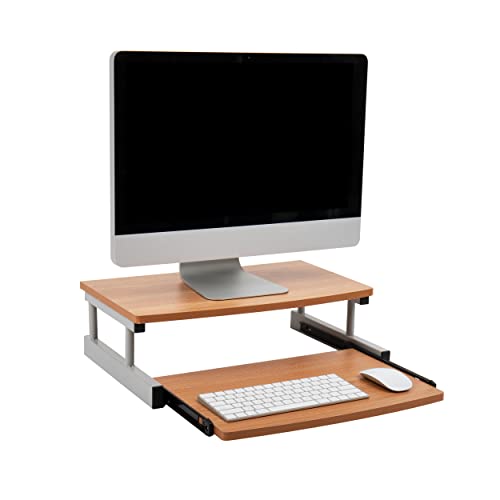
Mind Reader offers a monitor stand with a built-in sliding keyboard drawer. The unit provides a 20″ x 14.75″ footprint with a 5.9″ height, allowing ergonomic elevation for the monitor while tucking away the keyboard when not in use. It supports up to 50 lbs on the keyboard drawer and is made from MDF and metal for sturdy longevity. The design helps improve posture by raising the eyeline to reduce neck strain.
Key considerations
Consider whether you need a sliding keyboard drawer for hidden storage. Check the maximum weight capacity to ensure compatibility with your devices. Evaluate material durability if you use it daily and want long-term reliability.
FLEXISPOT 42-Inch Standing Desk Converter

This FLEXISPOT model emphasizes a 42-inch tabletop with a large keyboard tray, designed for dual monitors and a laptop. It features a quick-adjust mechanism for easy sit-to-stand transitions and a spacious work area to accommodate peripherals. The unit is built with ergonomic considerations to minimize wrist strain and support a healthy work routine. It ships with straightforward assembly instructions to minimize setup time.
Key considerations
Assess the tray width and depth to ensure comfortable keyboard and mouse use. Confirm the max load for the desktop and the tray to support your monitor and laptop configuration. Consider whether you want a bigger platform for future upgrades or more desk space for peripherals.
Buying Guide: Key Purchase Considerations
- Height range and adjustability: Look for smooth, reliable lifting mechanisms and a height range that accommodates your typical sitting and standing positions. Verify that the range fits your ergonomic targets.
- Surface area: A larger top surface helps with dual-monitor setups and laptop placement. Ensure the keyboard tray width and depth suit your keyboard and mouse combo.
- Weight capacity: Check the maximum supported weight for the desktop surface and for the keyboard tray. Heavy monitors require sturdier frames and borderless supports.
- Keyboard tray design: Some trays raise with the main surface; others slide out. Consider whether you prefer a separate sliding tray or a combined approach for easier access and organization.
- Ease of assembly: Quick assembly and clear instructions save time. Look for tools included or required for setup and whether the design minimizes any wobble after installation.
- Stability and materials: Steel frames typically offer stronger support than lighter materials. Rubber feet or pads help prevent slipping and protect desks.
- Cable management: Some models include features to hide or organize cables, which helps reduce clutter and improve aesthetics.
- Warranty and warranty coverage: A solid warranty reflects product durability and company support, useful for long-term use.
- Space and footprint: Measure your desk to ensure the riser fits with room for other peripherals, speakers, or document stands.
- Ergonomic outcomes: Elevating the monitors to eye level reduces neck strain; ensure the setup aligns your eye height with the top third of the screen for comfort during long sessions.