Best Single Monitor Desk Stands for Ergonomic Home Offices
Elevate your workspace with a single monitor desk stand that offers solid support, flexible positioning, and easy cable management. This guide highlights five top options that fit most 13″–32″ monitors, support VESA patterns, and provide height, tilt, swivel, and rotation adjustments for healthier posture and improved comfort during long work sessions.
Summary of chosen products:
| Product | Brand | VESA | Weight Capacity | Key Benefits |
|---|---|---|---|---|
| Single LCD Free-Standing Desk Stand | Hemudu | 50×50/75×75/100×100 mm | Up to 77 lbs | Wide size compatibility, strong base, full range of motion |
| STAND-V001H | VIVO | 75×75/100×100 mm | Up to 22 lbs | Ultrawide compatibility, ergonomic elevation |
| MU0023 | MOUNTUP | 75×75/100×100 mm | Up to 17.6 lbs | Flexible height, broad tilt/swivel/rotation |
| HUANUO Single Monitor Mount | HUANUO | 75×75/100×100 mm | 4.4–19.8 lbs | High adjustment range, sturdy build, easy one-hand tilt/rotate |
| TAVR Furniture Stand | TAVR Furniture | 75×75/100×100 mm | Up to 44 lbs | Tempered glass base, versatile tilt/swivel/rotation |
Hemudu Free-Standing Monitor Stand

The Hemudu HT05B-001 stand supports a single monitor from 13″ to 32″ with 50×50, 75×75, or 100×100 mm mounting patterns. It includes cable management to reduce desk clutter and promotes an ergonomic viewing angle with height adjustment along the center tube. Tilt ranges from -15° to +10°, swivel from -50° to +50°, and a full 360° rotation allow both portrait and landscape orientations. The design aims to improve neck and back posture during long work hours.
VIVO STAND-V001H Single Monitor Desk Stand
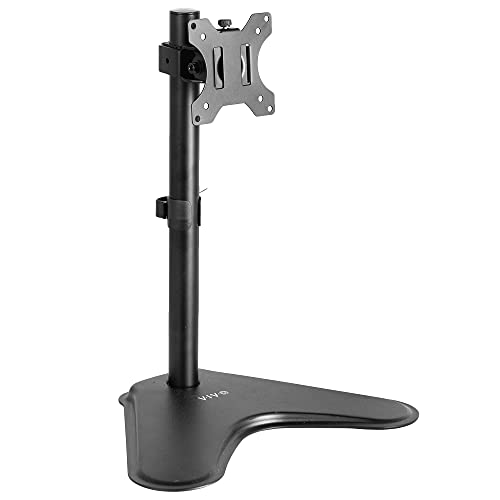
The VIVO STAND-V001H supports most 13″–32″ monitors and ultrawide up to 38″ with a maximum weight of 22 lbs. It emphasizes ergonomic viewing by elevating the screen. Its articulation delivers +15° to -15° tilt, 90° swivel, and 360° rotation, plus height adjustment along the center pole for precise positioning and comfortable line of sight.
MOUNTUP MU0023 Freestanding Monitor Stand

The MOUNTUP MU0023 frees you from desk mounting with a freestanding base and supports 13″–32″ screens up to 17.6 lbs. It offers +/- 30° tilt, +/- 25° swivels, +/- 180° rotations, and a height adjustment up to 17.49″ for varied seating positions. The build uses steel for durability, and the base is designed to minimize desk damage while providing strong stability.
HUANUO Single Monitor Mount

HUANUO’s single monitor arm fits 13″–32″ displays weighing 4.4–19.8 lbs with 75×75 or 100×100 mm VESA patterns. It emphasizes ergonomic design, enabling tilt from -50° to +85°, ±90° swivel, and 360° rotation. The arm elevates up to 39.6 cm (about 15.6 inches) from the desk, offering a one-handed adjustment experience. Built for long-term use, HUANUO focuses on stability and ease of adjustment.
TAVR Furniture Single Monitor Stand

The TAVR Furniture stand supports most monitors up to 32 inches and 44 lbs with a 75×75/100×100 mm mounting pattern. It offers a tilt range of -15° to +10°, a wide swivel of -70° to +70°, 360° rotation, and a height adjustment from 10.5″ to 18.4″. Its tempered glass base adds an aesthetic touch while preserving desk surface integrity, and the base design is intended to ease relocation for meetings or flexible setups.
Buying Guide: Key Purchase Considerations
- Monitor size and weight: Ensure the stand supports your screen’s size and weight (13″–32″ is common; ultrawide may require specific models).
- VESA compatibility: Most stands use 75×75 or 100×100 mm. Verify your monitor’s VESA pattern before buying.
- Mounting type: Choose freestanding or clamp/grommet mounts based on desk type and preference for mounting on the edge or through a back panel.
- Height adjustment: Look for a wide range to align with eye level and reduce neck strain. Some stands allow 15–18 inches of movement.
- Tilt, swivel, and rotation: A broad tilt range (-50° to +85°), swivel, and 360° rotation enable portrait/landscape modes and ergonomic positioning.
- Desk impact: Freestanding bases may include glass or metal footprints; consider desk stability and surface protection.
- Cable management: Integrated channels or clips help keep power and video cables organized for a clean workspace.
- Installation ease: Tools required and setup time vary; some models offer tool-free height adjustment or quick-release features.
- Build material and durability: Steel constructions typically offer greater stability and longevity than lighter plastics.
Across these options, buyers should balance stability, range of motion, and desk fit. Freestanding bases provide quick setup and flexibility for sharing spaces, while clamp or grommet mounts save desk real estate for fixed workstations. Weight capacity and VESA compatibility are essential to prevent wobble or incompatibility with larger screens. For extended computer use, prioritize stands with generous height and tilt ranges to maintain comfortable posture and eye level alignment.