Best Through-Desk Monitor Mounts for Flexible, Space-Saving Setups
The best through-desk monitor mounts are arms that include a grommet installation option, letting you secure the base through a desk hole instead of relying only on a clamp. The MOUNTUP is best for users who want broad movement and a stated grommet thickness range; the VIVO STAND-V001 supports heavier screens, while the NB SmooVex offers a mechanical-spring design. Check your monitor’s weight, VESA pattern, and desk construction before choosing.
| Mount | Best for | Key consideration |
|---|---|---|
| MOUNTUP Single Monitor Desk Mount | Wide reach and full motion | Monitor must weigh 4.4–19.8 pounds |
| VIVO STAND-V001 | Heavier compatible screens | Maximum monitor weight is 22 pounds |
| ErGear Single Monitor Mount | Basic grommet installation | Desk thickness must be 0.39–3.54 inches |
| VIVO STAND-V001C | Ultrawide screens up to 38 inches | Maximum monitor weight is 17.6 pounds |
| NB SmooVex Model-A5 | Mechanical-spring movement | Weight capacity is not specified in the supplied details |
MOUNTUP Single Monitor Desk Mount

This arm fits most 17- to 32-inch flat or curved monitors weighing 4.4 to 19.8 pounds, with VESA 75×75mm or 100×100mm mounting holes. Its C-clamp and grommet bolt both accommodate desks 0.39 to 2.76 inches thick. The arm extends up to 19.4 inches and adjusts in height up to 16.9 inches above the desk.
Best for: Buyers who want substantial reach and a clearly specified through-desk installation range. It was selected for its grommet option and detailed motion adjustments. Limitation: The monitor must meet the stated weight range, and curved screens with 1000R, 1500R, or 1800R curvature are not recommended for this model.
VIVO STAND-V001 Single Monitor Arm

This VIVO arm supports monitors up to 22 pounds with VESA 75×75mm or 100×100mm mounting patterns. It is listed for standard screens up to 32 inches and ultrawide screens up to 38 inches. Movement includes +90° to -90° tilt, 360° swivel, 360° rotation, and up to 16 inches of height adjustment along the center pole. Both a C-clamp and a grommet mount are included.
Best for: Buyers whose compatible monitor is heavier than the limits of lighter arms, or who want portrait and landscape positioning. Its higher stated load capacity and grommet option make it a useful choice for through-desk setups. Limitation: Verify the VESA pattern and screen weight; the mount is not a fit for screens above its 22-pound capacity.
ErGear Single Monitor Mount

This mount is designed for 13- to 32-inch monitors weighing up to 17.6 pounds, with VESA 75×75mm or 100×100mm mounting holes. It offers a choice of C-clamp or grommet-hole installation. The listed desk thickness range is 0.39 to 3.54 inches. Raising the screen and adjusting its viewing angle can also help free up desktop space.
Best for: Buyers seeking a straightforward mount with a relatively broad stated desk-thickness range for grommet installation. It was selected because its product details explicitly describe both mounting methods and installation conditions. Limitation: The manufacturer recommends a wooden desk with a clear underside; beams or panels may obstruct installation.
VIVO STAND-V001C Monitor Mount
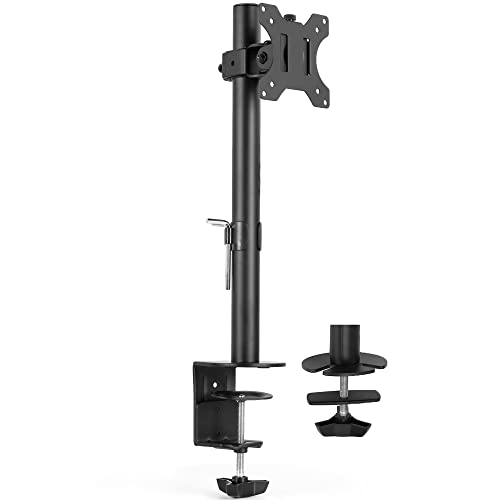
The STAND-V001C fits one 13- to 38-inch screen weighing up to 17.6 pounds, provided it has VESA 75×75mm or 100×100mm mounting holes. Its listed adjustments include +45° to -45° tilt, 90° swivel, and 360° rotation. Height adjusts along the center pole, and integrated cable management helps organize cords.
Best for: Owners of a larger or ultrawide monitor who need a VESA-compatible desk mount and want cable organization. It was selected for its stated support of screens up to 38 inches. Limitation: The 17.6-pound weight ceiling is lower than that of some alternatives, so screen size alone does not establish compatibility.
NB SmooVex Model-A5 Monitor Mount

The SmooVex Model-A5 uses a mechanical spring system and fits compatible flat or curved monitors up to 32 inches with VESA 75×75mm or 100×100mm holes. The product details describe both C-clamp and grommet mounting options and a three-step installation process. Its slimmer arm is intended to save desk space.
Best for: Buyers interested in a mechanical-spring arm and a grommet installation option. It was selected because its mounting choices and VESA requirements are clearly stated. Limitation: The supplied product details do not state a monitor weight capacity or desk-thickness range, so confirm both with the seller before purchase.
Buying Guide
How does a through-desk monitor mount attach?
A through-desk, or grommet, mount passes a bolt through an opening in the desktop and secures the arm from below. This differs from a C-clamp, which grips the desk edge. Confirm that your desk has a usable hole or can be drilled, and check the mount’s instructions for required hole size and clearance.
What should I check before buying?
- Monitor weight: Check the screen’s weight without its original stand and keep it within the mount’s stated capacity.
- VESA pattern: The products above specify 75×75mm or 100×100mm patterns. Check the rear of the monitor or its specifications.
- Desk construction: Confirm thickness, underside clearance, and whether the surface can support a secured arm. Some listed products give specific thickness limits.
- Movement: Compare height adjustment, extension, tilt, swivel, and rotation based on how you use your workstation.
- Screen size and shape: Check the stated size range, but do not use screen size as a substitute for verifying weight and VESA fit.
Should I choose a grommet mount or a clamp?
Choose a grommet mount if your desk has a suitable opening and you prefer a base that installs through the desktop. A clamp can be more convenient when drilling is not an option, but it needs an accessible desk edge and a compatible thickness. Several products in this list include both methods.
Frequently Asked Questions
Can I use a monitor arm without VESA holes?
The mounts listed here require VESA 75×75mm or 100×100mm mounting holes. Check whether your monitor supports one of those patterns before buying.
Does a 38-inch monitor fit every mount listed?
No. Only certain products specify support for screens up to 38 inches, and the monitor must also meet the mount’s weight and VESA requirements.
Can a grommet mount be installed in any desk hole?
Not necessarily. Hole size, desk thickness, surface construction, and clearance underneath can affect installation. Confirm those details in the product instructions.
Is a heavier weight capacity always better?
A higher capacity provides a wider stated weight range, but the monitor must still fit the mount’s VESA pattern and screen-size guidance. Match all compatibility limits, not just capacity.