Best Desk Converters to Turn a Regular Desk Into a Standing Desk
To turn a regular desk into a standing desk, place a height-adjustable desk converter on top and move your monitor and keyboard onto it. The FLEXISPOT 42-inch riser is best for larger multi-monitor setups, while the VIVO 26-inch model suits compact spaces. For push-button adjustment, consider FLEXISPOT’s electric 35-inch converter. The ErGear option is a complete standing desk, not a desktop converter, and may suit shoppers willing to replace rather than adapt their existing desk.
| Product | Best for | Type |
|---|---|---|
| FLEXISPOT 42-inch converter | Large workstation setups | Desktop riser |
| VIVO 26-inch converter | Small desks and single screens | Desktop riser |
| FLEXISPOT 35-inch electric converter | Button-controlled adjustment | Desktop riser |
| FLEXISPOT 40-inch converter | Wide keyboard workspace | Desktop riser |
| ErGear 48-inch electric desk | Replacing a regular desk | Complete desk |
FLEXISPOT 42-Inch Large Desk Converter

This large desktop riser is best for people who want to keep their existing desk while creating a roomy sit-stand workstation. Its 42-inch surface is described as suitable for triple-monitor use, and a separate keyboard tray helps position the keyboard below the main desktop.
The mechanical spring lift system is designed for smooth height adjustment. The unit arrives almost fully assembled; setup involves attaching the keyboard tray. It is a strong option when workspace area and a dedicated keyboard surface matter more than a small footprint.
- Best for: Larger monitor setups and home offices.
- Consider: Check the available desk space before choosing this wide riser.
VIVO 26-Inch Compact Desk Converter

The VIVO single-top converter is best for a small desk, apartment workspace, or single-monitor setup. Its 26.4-by-18.5-inch surface is intended to accommodate a monitor or laptop and a full-size keyboard. The compact design takes less room than the larger risers in this list.
Height adjustment uses a squeeze handle, with five lockable settings from 8.5 to 15.9 inches above the desk surface. Its resting height is 1.8 inches. Choose this model if you want a straightforward manual riser; avoid it if your setup needs a broad multi-monitor surface.
- Best for: Compact work areas and simpler computer setups.
- Consider: The listed surface dimensions limit how much equipment it can hold.
FLEXISPOT 35-Inch Electric Desk Converter

This motorized riser is best for buyers who prefer button-operated height changes over a manual lift. Its one-touch control panel adjusts the platform from 5.7 to 19.7 inches. The product information lists support for up to 55 pounds total: 44 pounds on the desktop and 11 pounds on the keyboard tray.
The 35-inch surface is a middle-sized option, and the unit arrives nearly assembled, with the keyboard tray to attach. Its electric lift may be convenient for frequent changes between sitting and standing. Choose another model if you do not want a motorized converter or need a wider top.
- Best for: People who want powered height adjustment.
- Consider: Keep the listed desktop and tray weight limits in mind.
FLEXISPOT 40-Inch Wide Desk Converter
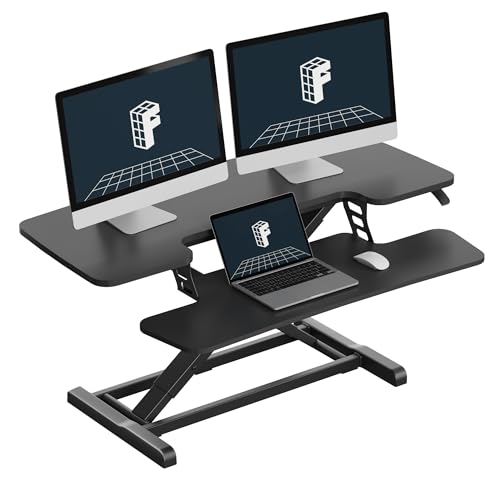
The 40-inch FLEXISPOT converter is best for buyers seeking a wide riser with a separate keyboard tray. Its mechanical spring lift system is designed for stable height adjustment, and the listing describes quick setup with the tray attached after unpacking. The tray is intended to help keep arms at a more natural typing angle.
This model is a practical choice for people who want to adapt a regular desk without installing a complete replacement desk. Its wider footprint can provide more room than a compact converter, but it still needs adequate space on the existing desktop.
- Best for: A wider work surface and separate keyboard placement.
- Consider: Confirm that your regular desk has enough usable depth and width.
ErGear 48-Inch Electric Standing Desk

This is a complete electric desk rather than a converter, so it is best for buyers who are open to replacing their regular desk. Its 48-by-24-inch top adjusts from 28.35 to 46.77 inches, and the controls can save three preferred height settings. The steel frame and lifting columns are described as designed for stability.
Choose this option if your existing desk is unsuitable for a riser or you want the whole work surface to move. It does not sit on top of an existing desk, so it is not the right choice when retaining the current desk is essential.
- Best for: Replacing a fixed-height desk with a powered sit-stand model.
- Consider: This requires changing the desk, not adding a converter.
Buying Guide: How To Choose A Desk Converter
How much workspace do you need?
Measure the usable area of your current desk before selecting a riser. A compact model such as the VIVO may suit one monitor or a laptop, while the 40- and 42-inch FLEXISPOT models offer wider surfaces for larger setups. Also account for the keyboard tray, monitor stand, and other items you plan to place on the converter.
Should you choose manual or electric adjustment?
A manual converter uses a handle or lift mechanism and does not rely on the button-operated adjustment described for a motorized model. The VIVO has five lockable settings, while the FLEXISPOT 35-inch model uses a one-touch electric control. Consider how often you expect to change heights and which adjustment style best suits your routine.
Will a converter work with your existing desk?
A converter needs a stable, sufficiently large surface to rest on. Compare the product’s dimensions with your desk and consider the weight of your monitors, laptop, and accessories. The 35-inch electric model lists separate weight limits for its desktop and keyboard tray. If you need a new height-adjustable work surface instead, a complete desk such as the ErGear is a different type of solution.
Frequently Asked Questions
What is the easiest way to turn a regular desk into a standing desk?
Place a height-adjustable desk converter on the existing desk, then position your monitor and keyboard on the riser. Adjust it so you can work comfortably while seated or standing.
Do I need to replace my current desk?
No. A converter is designed to sit on top of a regular desk. A complete standing desk is an alternative when you want to replace the entire work surface.
Are electric desk converters better than manual ones?
Neither type is best for everyone. Electric adjustment offers button-controlled movement, while manual models use a handle or lift mechanism. Choose based on your preferred adjustment method and workspace needs.
How do I choose the right converter size?
Measure your desk and the equipment you plan to use. Make sure the converter has enough surface area for your monitor or laptop and a suitable place for your keyboard.
Can I use a desk converter with multiple monitors?
Some converters are described for larger or multi-monitor setups, including the FLEXISPOT 42-inch model. Check the specific surface dimensions and any listed weight limits before placing equipment on a riser.