Best TV Stand Swivel Bases for Flexible Viewing
The best TV stand swivel base depends on your TV’s screen size, weight, VESA pattern, and how far you need the screen to turn. The PERLESMITH PSTVS33 is best for broad height adjustment, while the Perlegear base suits larger TVs up to 70 inches and adds tilt. For a 27-65-inch TV, WKWKER offers a wide size range and straightforward 30-degree swivel. Check your television’s mounting pattern and weight before choosing.
| Product | Best For | Key Range |
|---|---|---|
| PERLESMITH PSTVS33 | Height flexibility | 24-60 inches; 50° each way |
| Perlegear | Larger TVs with tilt | 32-70 inches; 30° each way |
| WKWKER | Wide VESA coverage | 27-65 inches; 30° each way |
| Rfiver | Defined height steps | 27-60 inches; six levels |
| Hemudu | Wide swivel range | 32-65 inches; 40° each way |
PERLESMITH PSTVS33: Best for Height Adjustment

This stand fits TVs from 24 to 60 inches, supports up to 99 pounds, and accepts VESA patterns from 100 × 100 mm to 400 × 400 mm. Its 50-degree swivel range in either direction makes it useful when seating is spread across a room.
It is best for buyers who need more control over screen height: 12 configurations combine four pillar heights with two bracket heights. Choose this model if adjusting the screen position is a priority. Confirm that your TV’s VESA pattern falls within the stated range; the product information does not specify a tilt function.
Perlegear: Best for Larger TVs and Tilt

The Perlegear base is designed for 32- to 70-inch TVs weighing up to 88 pounds. Its supported VESA patterns extend through 400 × 400 mm. The screen turns 30 degrees left or right, and the mount tilts up to 8 degrees to help address a forward-leaning screen.
It is best for buyers who want a larger screen range, swivel, and a modest tilt adjustment in one tabletop base. Nine height configurations also allow space for devices such as a soundbar or cable box. Check the TV’s VESA pattern before ordering; the stated swivel is 30 degrees per side, not 60 degrees each way.
WKWKER: Best for Broad VESA Coverage

WKWKER fits 27- to 65-inch LED and LCD TVs, supports up to 88 pounds, and lists VESA patterns from 75 × 75 mm to 400 × 400 mm. The screen swivels 30 degrees left or right, and adjustable bracket and upright positions let buyers select a viewing height.
This model is best for people replacing a TV’s original feet or avoiding wall drilling while accommodating a broad range of mounting patterns. Choose it if your TV falls within the stated size, weight, and VESA limits. The supplied feature details do not state a specific number of height positions or a tilt range.
Rfiver: Best for Set Height Steps
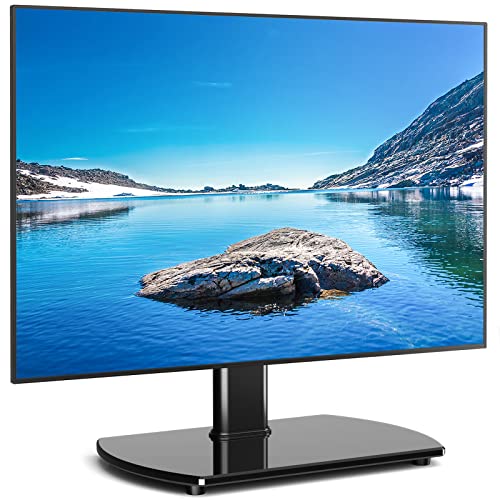
Rfiver’s stand supports TVs from 27 to 60 inches and up to 88 pounds. It lists VESA compatibility from 100 × 100 mm through 400 × 400 mm, with additional patterns in between. The steel support and 8 mm tempered-glass base form the tabletop structure.
It is best for buyers who want six specified height levels, adjustable from 18.5 to 24.4 inches, and room to position a soundbar. This can help when a TV needs to sit higher on a cabinet. The product details do not give a swivel angle, so buyers needing a clearly specified turning range may prefer another option.
Hemudu: Best for a Wide Swivel Range

Hemudu is designed for 32- to 65-inch TVs with VESA patterns from 100 × 100 mm to 600 × 400 mm. It supports screens up to 88 pounds and swivels up to 40 degrees in either direction. Its listed construction includes a steel pole and 8 mm tempered-glass base.
This stand is best for rooms where viewers sit at notably different angles, or for TVs with a compatible VESA pattern larger than 400 × 400 mm. The product information describes four height levels but does not list their exact height range. Verify the VESA pattern and available tabletop space before purchase.
Buying Guide: How to Choose a Swivel TV Stand Base
Does the stand fit your TV?
Start with three specifications: screen size, TV weight, and VESA pattern. VESA is the horizontal-by-vertical spacing between the mounting holes on the back of the TV, usually measured in millimeters. A stand can fit the screen-size range yet still be incompatible if its VESA range does not include your TV’s pattern. Stay within the stand’s stated weight limit.
How much swivel do you need?
Compare the stated angle per side. A stand that turns 30 degrees left and right offers less adjustment than one that turns 40 or 50 degrees each way. Consider where the TV will sit and whether viewers watch from a sofa, dining area, or room corner. If the product listing does not specify a swivel angle, do not assume it matches another model’s range.
Will the height and base work with your furniture?
Check the stand’s height options against your preferred screen position and the space available for a soundbar or other devices. Also compare the base dimensions with the furniture surface. The base must fit securely on the tabletop, and the furniture should be stable enough for the TV and stand together. Tempered glass and steel are listed on several models, but the TV’s mounting compatibility still needs verification.
Do you need tilt as well as swivel?
Swivel turns the screen from side to side; tilt changes its vertical angle. Most listed models emphasize swivel, while the Perlegear product specifically states an upward tilt of up to 8 degrees. If reducing glare or correcting a forward lean matters, confirm that tilt is included rather than relying on swivel alone.
Frequently Asked Questions
How do I find my TV’s VESA pattern?
Measure the distance between the mounting holes on the back of the TV, first horizontally and then vertically. Compare those measurements in millimeters with the stand’s listed VESA patterns.
Can a swivel TV stand replace wall mounting?
Yes. These products are tabletop bases designed to support a compatible TV on furniture, so wall drilling is not required for their stated use.
Does a larger screen automatically fit the stand?
No. Screen size is only one requirement. The TV must also match the stand’s VESA pattern and remain within its weight capacity.
What is the difference between swivel and tilt?
Swivel rotates the screen left or right. Tilt angles the screen upward or downward. A stand may offer one adjustment without offering the other.
Can I put a soundbar under the TV?
Some models advertise height adjustment or space for a soundbar, but available clearance varies by setup. Check the stand’s height range and the soundbar’s dimensions before choosing.