Best Computer Desks With Wireless Charging for Home and Gaming Setups
The best choice depends on whether you need a complete desk or a charging accessory for an existing one. The YDN is a full standing desk with wireless charging, while the Vaydeer adds charging and storage as a monitor riser. For a large work or gaming surface, wireless charging mouse pads from VOVIPO, Miroddi, and abc.mat offer different combinations of device support, lighting, and phone positioning.
| Product | Best For | Notable Feature |
|---|---|---|
| YDN Glass Standing Desk | A complete adjustable desk | Electric height adjustment and wireless charging |
| Vaydeer Monitor Stand Riser | Dual-monitor organization | Wireless charging, USB ports, and drawers |
| VOVIPO 3-in-1 Mouse Pad | Charging several device types | Phone, earbuds, and smartwatch charging |
| Miroddi RGB Mouse Pad | Gaming and colorful setups | RGB lighting and foldable phone stand |
| abc.mat Magnetic Mouse Pad | Large, tidy desk surfaces | Magnetic phone charging and an XXL mat |
YDN Glass Standing Desk

Best for: Buyers who want wireless charging integrated into a full-size computer desk, rather than added through a desk mat. The 55-inch desk combines a wireless charging area with Type-C wired charging.
Its motorized height adjustment spans 28.3 to 46.5 inches and includes four programmable presets. The tempered-glass desktop can also be used as a dry-erase whiteboard, and the reinforced steel frame is listed to support up to 132 pounds. This makes it the most complete choice for a workstation that needs sit-to-stand adjustment.
Limitation: It is a substantial furniture purchase, and some encrypted charging cables may not be compatible with its Type-C charging feature.
Vaydeer Dual Monitor Stand Riser
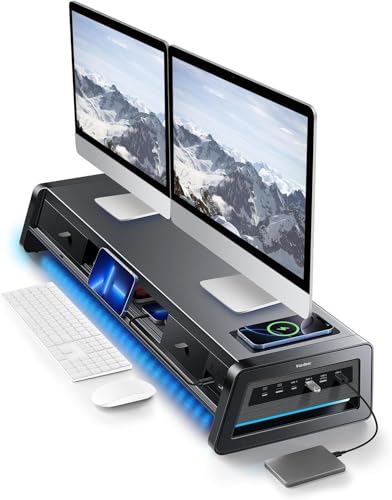
Best for: People who already have a desk and want to add monitor elevation, charging, and storage. The 39.3-inch metal riser is designed for two monitors and includes a 15W wireless charging pad, eight USB ports, two drawers, and an LED light strip.
Four USB ports are described as fast-charging ports, while four support data transfer. Two-tier storage and the drawers provide space for small office supplies. Choose this if organizing a dual-monitor desk is as important as adding wireless charging.
Limitation: This is a monitor riser, not a replacement computer desk. Confirm that its listed 39.3-inch width fits the intended workspace.
VOVIPO 3-in-1 Wireless Charging Mouse Pad

Best for: Users who want a wide desk mat with separate charging support for a phone, earbuds, and smartwatch. The 90-by-40-centimeter surface is large enough for a keyboard, mouse, and laptop, according to the product details.
The listed charging outputs are up to 15W for smartphones, 5W for earphones, and 2.5W for smartwatches. That three-device arrangement makes it a broader charging option than mats limited to phones and earbuds. It is intended for Qi-compatible devices, and the listing provides examples of supported phone and earbud families.
Limitation: A power adapter is not included. The listing recommends a fast-charging adapter rated above 25W and a fast-charging cable for optimized wireless charging. Check device support before buying.
Miroddi RGB Wireless Charging Mouse Pad

Best for: Gamers and desk users who want lighting, a phone stand, and two-device wireless charging in one mat. The product lists up to 15W charging for compatible Qi phones and up to 5W for compatible wireless earbuds.
The foldable stand holds a phone for calls or viewing and can be folded flat when it is not needed. Eleven selectable lighting colors and four lighting modes let buyers customize the look without adding a separate light strip to the desk.
Limitation: Charging speed depends on the device, case, alignment, and power input. Check the required power setup and device compatibility before relying on the pad for faster charging.
abc.mat Magnetic Charging Desk Mat

Best for: Buyers who want a large, easy-to-clean mat with magnetic phone positioning. Its 31.5-by-15.8-inch surface is designed to fit a keyboard, mouse, tablet, and other desk items, while the magnetic charging area keeps a compatible phone accessible.
The listing describes 7.5W magnetic wireless charging for iPhone 8–17 series and up to 15W for certain Samsung, Google Pixel, and LG phones with a magnetic case. A separate 5W area is specified for compatible AirPods. The mat is listed as waterproof and has a non-slip surface.
Limitation: Magnetic alignment and charging depend on the phone, case, and device support. Check the stated charging requirements for the exact phone and earbuds you plan to use.
Buying Guide: How to Choose a Computer Desk With Wireless Charging
Do you need a whole desk or an add-on?
Choose a full desk if you need a new workstation and want charging built into the furniture. The YDN combines charging with motorized height adjustment. If you already have a suitable desk, a monitor riser or charging mat can add useful features without replacing it. The Vaydeer is geared toward monitor elevation and storage; the mats are better suited to charging and mouse use.
Which devices do you need to charge?
Check whether the product supports your phone and any earbuds or wearable devices. The VOVIPO lists charging areas for phones, earphones, and smartwatches. The Miroddi and abc.mat options describe phone and earbud charging. Wireless charging generally requires a compatible device, and cases or poor alignment can affect operation.
Does the charging accessory include a power adapter?
Do not assume a charging mat includes its power supply. The VOVIPO listing says its adapter is not included and recommends an adapter above 25W. Charging requirements differ by product, so check the listed adapter and cable guidance before choosing a mat.
How much surface and storage do you need?
Compare the mat dimensions with the available desk space and the footprint of your keyboard and mouse. Choose a monitor riser if you want to raise displays and store small items underneath or in drawers. If you use a standing desk, consider its height range, preset controls, desktop material, and stated weight capacity.
Frequently Asked Questions
Can a wireless charging mouse pad replace a computer desk?
No. A mouse pad is an accessory that sits on a desk. The YDN is the product in this selection designed as a complete computer desk.
Will any smartphone charge on these products?
No. The phone must support the wireless charging standard specified by the product. Check the product details and your device’s specifications before purchasing.
Are power adapters included with wireless charging mats?
Not necessarily. The VOVIPO listing explicitly says its adapter is not included, and the Miroddi listing notes that its charging speed depends on power input. Review each product’s included accessories and power requirements.
Which option is best for a dual-monitor workstation?
The Vaydeer is specifically described as a dual-monitor stand riser. It combines monitor support with a wireless charging pad, USB ports, and drawers, but it does not replace the desk.
Can a standing desk also provide wireless charging?
Yes. The YDN combines a wireless charging feature with motorized height adjustment and four programmable presets. Its listed height range is 28.3 to 46.5 inches.